

AFT(Army fitness Test) Calculator
Estimate your Army Fitness Test performance summary instantly. Enter your details and event results to generate a shareable result link and copy-ready outputs.
Results
Calculator usage
You’re using: —
Counts are global across CalculatorGeek.
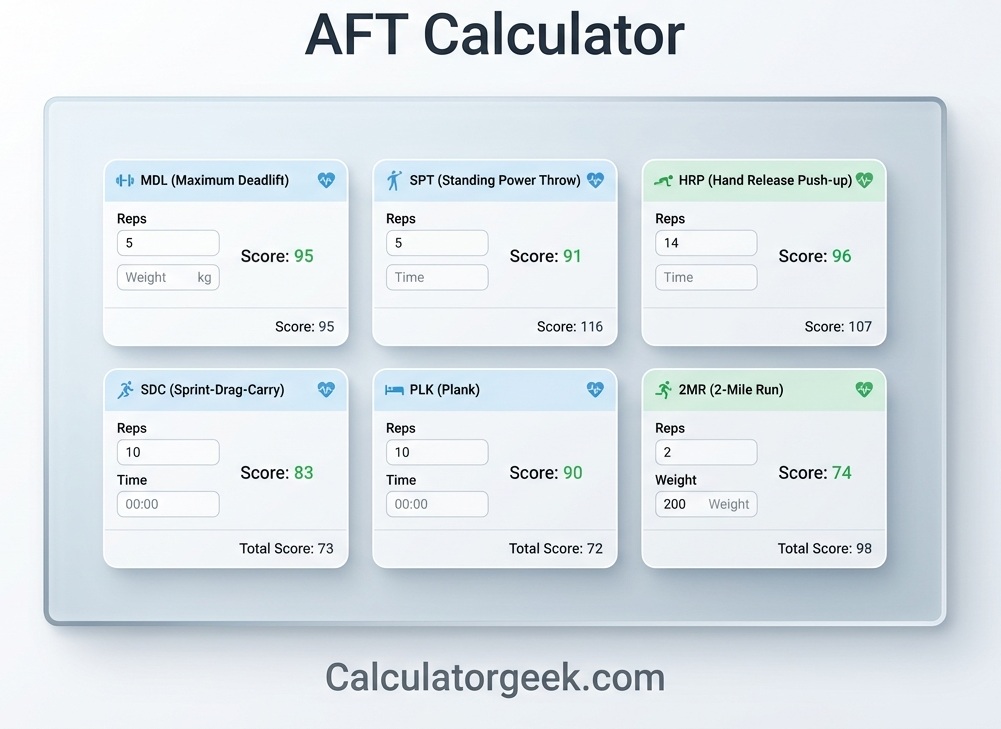
The AFT Calculator helps you estimate your Army Fitness Test score based on your event performance and the scoring standards your test uses. Instead of guessing whether you’re passing—or where you’re losing points—this calculator breaks your results into clear event scores and a total you can verify at a glance.
On June 1, 2025, the Army Fitness Test (AFT) became the official test of record, replacing the Army Combat Fitness Test (ACFT), which previously replaced the older Army Physical Fitness Test (APFT). That means this AFT Calculator is the right tool if you’re aiming to check your performance against the current AFT scoring approach and minimum standards.
In this guide, you’ll learn what the AFT measures, what inputs matter most, and how to interpret your score for training and goal-setting. You’ll also see common scoring mistakes (like mixing units, entering time formats incorrectly, or comparing to the wrong standard), plus quick troubleshooting tips if your total looks “off.”
If you want a fast, practical way to plan improvements, the AFT Calculator is most useful when you treat it like a feedback tool: enter accurate results, confirm your standards, and focus on the one or two events with the highest payoff.
Key Takeaways
- The AFT Calculator estimates your total score by converting each event performance into points, then adding them together.
- Your score accuracy depends most on correct units (kg vs lb, meters vs centimeters, minutes:seconds format).
- Small input mistakes (like
7.30vs7:30) can change totals significantly—always double-check time formatting. - The best way to improve your total is usually to target your lowest-scoring event first, not your strongest one.
- Use the calculator for goal-setting: test a target improvement (e.g., -15 seconds on a run) to see point impact.
- Compare scores only when the same scoring standard is used (different standards/age/group rules can change results).
- If your total looks wrong, the cause is usually one of three things: unit mismatch, time format error, or wrong standard selection.
- The calculator is most useful when you track results over time and aim for consistent progress, not one-off bests.
AFT Calculator: What it is and who should use it
An AFT Calculator is a score-estimation tool that converts your Army AFT event performance into points, then combines those points into a total score. It’s designed to help you understand where your points come from and what changes (faster time, more reps, heavier lift) will most improve your overall result.
Who should use an AFT Calculator
- First-time test takers who want a clear checklist of what to enter and how scoring is interpreted.
- Anyone training for improvement who wants to test “what-if” scenarios (for example, “What happens if I cut 20 seconds off my run?”).
- Coaches and unit leaders who need quick, consistent score estimates for planning training focus.
- People comparing multiple attempts who want a standardized way to log results over time.
When an AFT Calculator is most useful
- Right after a practice test, to spot your lowest point event and prioritize training.
- Before a test, to set realistic targets for each event and avoid over-focusing on one area.
- During a training block, to track progress and keep goals measurable.
What an AFT Calculator does not do
- It doesn’t replace official scoring instructions or command policies.
- It can’t fix incorrect inputs—if you enter the wrong unit or time format, your score estimate will be wrong.
AFT Calculator: How scoring works
The AFT Calculator works by turning each event result (weight, distance, reps, or time) into a point score, then adding all event points to produce your total AFT score. In other words: performance → event points → total score.
The scoring flow (how your total is built)
- You select the correct test setup (your standard/category and the event options where applicable).
- You enter each event result using the correct unit format (kg/lb, meters/cm, reps, minutes:seconds).
- The calculator converts each result into an event score based on the scoring table/standard used.
- All event scores are summed into a total (and can also be shown as a per-event breakdown).
What affects your score the most
- Time-based events (like SDC and 2MR) are very sensitive to formatting—seconds matter.
- Reps-based events (HRP) depend on accurate counting and correct form rules (your reps are your score input).
- Power/strength events (MDL and SPT) depend heavily on entering the correct unit and measurement style.
Why two people can get different totals with “similar” performance
- They may be using different standards/categories inside the calculator.
- One may have entered results in the wrong unit (e.g., lb treated as kg).
- Time formats may differ (e.g.,
7.30interpreted differently than7:30).
What you should always verify before trusting the total
- Your units are correct for every field.
- Your time format is correct (minutes and seconds, not decimals).
- You’re using the same scoring standard you intend to be measured by.
What you need before using the AFT Calculator
To get an accurate result from an AFT Calculator, you only need two things: your real event results and the correct input format for each event. Most “wrong totals” happen because of unit or time-format errors—not because the calculator is broken.
1) Your event results (recorded clearly)
Have your performance written down in a simple log like this:
- MDL (deadlift): max weight (kg or lb)
- SPT (power throw): best distance (meters/centimeters or feet/inches)
- HRP (push-ups): total reps in the allowed time window
- SDC: time as minutes:seconds
- PLK: time as minutes:seconds
- 2MR: time as minutes:seconds
2) Correct units and time formatting
Use these rules every time:
- Weight: enter either kg or lb (don’t type “kg/lb” in the number box).
- Distance: use one system consistently (meters/cm OR feet/inches).
- Time: always use mm:ss (example:
07:30).- Avoid decimals like
7.30because that can be interpreted incorrectly.
- Avoid decimals like
3) The right standard/category selection (if the calculator offers it)
If the calculator asks for a category/standard (for example, a “combat standard” or a minimum-point standard), choose the one you’re actually being measured against. Using the wrong standard is the #1 reason score comparisons don’t match.
Quick checklist before you hit “Calculate”
- ✅ Did you choose the correct unit system for each event?
- ✅ Are all time fields entered as mm:ss?
- ✅ Did you enter your best valid attempt (not practice reps or partials)?
- ✅ Are you using the correct AFT standard inside the calculator?
How to use the AFT Calculator
To use the AFT Calculator, you enter your event performance in the correct units, confirm your test setup, and review the per-event breakdown before trusting the final total. The fastest way to get a useful result is to treat it like a checklist—not a guessing tool.
Step-by-step: enter results correctly
- Set your test options
- Choose your standard/category if the calculator provides it (this affects point conversions).
- If there’s an event option (for example, plank vs another core option), select the one you actually performed.
- Enter MDL (deadlift)
- Input the maximum weight lifted in kg or lb.
- If both unit boxes exist, enter only one—don’t convert twice.
- Enter SPT (power throw)
- Input your best valid throw distance.
- Use a consistent distance system: meters/cm or feet/inches.
- Enter HRP (push-ups)
- Enter total valid reps completed inside the time limit.
- Do not enter “attempted reps” or partial reps—only counted reps.
- Enter SDC (sprint/drag/carry)
- Enter time as minutes:seconds (example:
02:10). - Avoid typing
2.10(that can be interpreted as a decimal).
- Enter time as minutes:seconds (example:
- Enter PLK (plank)
- Enter time as minutes:seconds (example:
03:25).
- Enter time as minutes:seconds (example:
- Enter 2MR (two-mile run)
- Enter time as minutes:seconds (example:
15:40).
- Enter time as minutes:seconds (example:
- Review your event breakdown
- Check each event’s points.
- If one event looks unusually high/low, re-check units and time formatting for that field.
Best way to use it for improvement
- Run a “what-if” test: improve one event slightly (like -10 seconds on 2MR) and see how many points it adds.
- Repeat for your lowest event. That’s usually where your biggest total gain lives.
Common input errors to avoid (quick)
- Using
7.30instead of7:30 - Entering lb in a kg field
- Mixing meters and feet/inches in the same distance input
- Entering averages instead of best valid attempts
Army AFT events
The Army AFT includes multiple events that test strength, power, muscular endurance, agility, core endurance, and aerobic capacity. Each event measures a different quality, so your best overall score usually comes from improving the lowest event rather than chasing tiny gains in your strongest one.
Below is what each event measures, what to enter in the AFT Calculator, and what typically causes scoring/input errors.
Repetition Maximum Deadlift (MDL)
The MDL measures lower-body and posterior-chain strength (legs, hips, back) through a maximum lift. In an AFT Calculator, MDL is usually entered as your max weight lifted.
What to enter
- Your maximum successful weight (kg or lb), based on valid attempt rules in your test.
What MDL rewards
- Higher absolute strength and efficient lifting mechanics.
Common input mistakes
- Entering lb as kg (or the reverse).
- Entering your “working set” instead of your true max attempt.
- Including an invalid attempt (only use the best valid lift).
Practical training note
- If your MDL is low, improving technique and building posterior-chain strength can produce large point gains early.
Standing Power Throw (SPT)
The SPT measures explosive power—mainly hips, core, and upper-body coordination—by throwing a medicine ball backward overhead for distance. In an AFT Calculator, SPT is entered as your best valid throw distance.
What to enter
- Your longest valid throw in:
- meters/centimeters, or
- feet/inches
Use one system consistently.
What SPT rewards
- Explosive hip extension, timing, and full-body coordination (power transfer).
Common input mistakes
- Mixing units (entering centimeters in a meters-only box).
- Rounding incorrectly (for example, entering
6.5meters when your measurement is6.05). - Entering an average of multiple throws instead of the best valid attempt.
Practical training note
- If SPT is lagging, small technique upgrades (timing + hip drive) can improve distance fast compared to purely strength-based events.
Hand-Release Push-Up (HRP)
The HRP measures upper-body muscular endurance (chest, shoulders, triceps) with strict movement standards. In the AFT Calculator, HRP is entered as the total number of valid reps completed within the time limit.
What to enter
- Your counted HRP reps (not attempted reps).
What HRP rewards
- Efficient pacing, consistent form, and endurance under fatigue.
Common input mistakes
- Entering “close reps” that weren’t counted (only use valid reps).
- Forgetting the time window and entering total reps from a longer practice set.
- Misreading your log (e.g., entering set reps instead of total reps).
Practical training note
- HRP often improves most with a pacing plan: start controlled, then accelerate in short bursts instead of going all-out early.
Sprint / Drag / Carry (SDC)
The SDC measures speed, agility, grip, and work capacity through multiple shuttle segments (sprint, drag, lateral, carry). In an AFT Calculator, SDC is entered as a time, and time-entry accuracy matters a lot.
What to enter
- Your total SDC time in minutes:seconds format, for example:
02:15.
What SDC rewards
- Fast transitions, efficient movement mechanics, and the ability to maintain speed under load.
Common input mistakes
- Using decimals instead of time format (typing
2.15instead of2:15). - Dropping leading zeros and confusing the field (type
02:05, not2:5). - Entering a split time instead of the full event time.
Practical training note
- If your SDC is your lowest event, improvement often comes from better transitions and short-burst conditioning—small time cuts can add meaningful points.
Plank (PLK)
The PLK measures core endurance—your ability to hold a stable, rigid position over time. In the AFT Calculator, plank is entered as a duration, and like other timed events, format is critical.
What to enter
- Your plank hold time in minutes:seconds, for example:
03:30.
What PLK rewards
- Consistent bracing, breathing control, and avoiding form breaks that end the hold early.
Common input mistakes
- Entering
3.30(decimal) instead of3:30(time). - Entering your “target time” instead of your actual tested hold.
- Using a practice hold from a different standard (always log the valid test hold).
Practical training note
- Many people improve plank quickly by training shorter, high-quality holds with perfect position—then extending time gradually.
Two-Mile Run (2MR)
The 2MR measures aerobic endurance and pacing discipline over distance. In the AFT Calculator, 2MR is entered as a time, and even small changes in seconds can impact points.
What to enter
- Your two-mile run time as minutes:seconds, for example:
15:45.
What 2MR rewards
- Steady pacing, efficient stride, and endurance under fatigue.
Common input mistakes
- Typing decimals (
15.45) instead of time (15:45). - Entering a treadmill estimate that doesn’t match your actual test environment.
- Forgetting that conditions (heat, wind, course) affect performance—use your real timed attempt.
Practical training note
- If 2MR is your lowest scorer, a simple pacing plan plus consistent easy runs often improves time more reliably than “all-out” workouts every session.
AFT scoring formula
The AFT Calculator converts each event result into points using the selected scoring standard, then adds all event points to produce your total score. The core math is simple—the only “hard part” is the event-to-points conversion.
Human-readable formula (how totals are calculated)
Total AFT Score = MDL points + SPT points + HRP points + SDC points + PLK points + 2MR points
Where each event’s points come from a conversion rule:
- MDL points = points for your max weight
- SPT points = points for your throw distance
- HRP points = points for your rep count
- SDC points = points for your time
- PLK points = points for your time
- 2MR points = points for your time
How event results become points (what the calculator is doing)
Most AFT scoring systems work like this:
- Check minimum / valid range
- If your value is below the minimum, the event may score 0 or fail depending on the standard.
- Convert the result to points
- Weight/distance/rep events: higher result → higher points
- Time events: lower time → higher points
- Round the way the standard requires
- Many calculators round inputs (seconds, distance, weight) before converting to points.
What this means for accuracy (important)
- If your calculator uses a lookup table, your result is mapped to the closest matching row/step.
- If your calculator uses a formula curve, it still behaves like a table behind the scenes (inputs map to point bands).
Voice-friendly quick answers
- “How is the AFT total score calculated?” By adding the points from all six events.
- “Why do a few seconds matter?” Because time-based events often change points in small step intervals.
AFT Calculator score chart
An AFT score chart is a quick way to see how each event performance converts into points (and how those points add up to your total). The AFT Calculator uses the same idea—event-by-event conversion—then gives you the combined score.
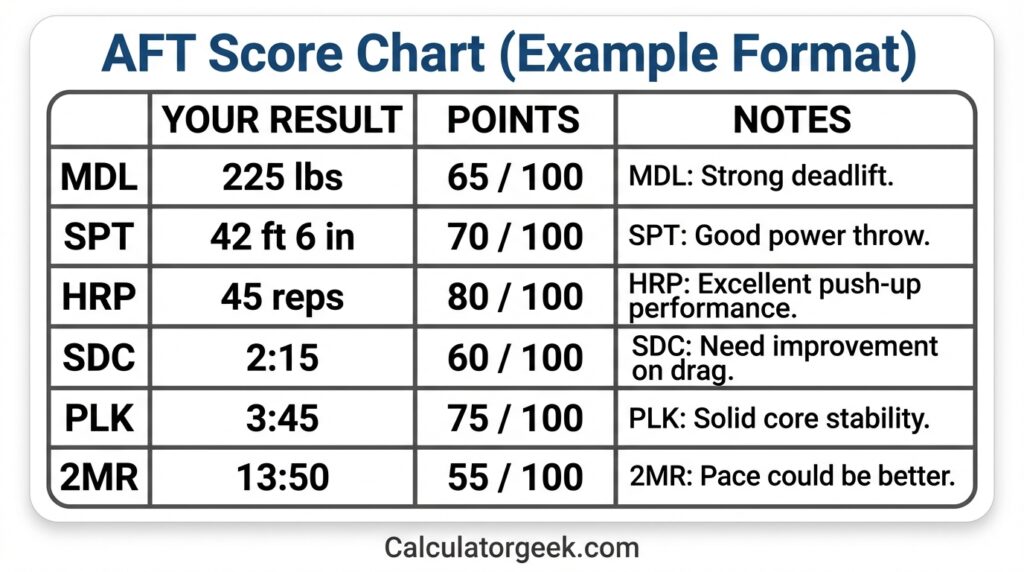
How to read an AFT score chart (quick)
- One row = one event (MDL, SPT, HRP, SDC, PLK, 2MR).
- Your performance is converted into event points.
- All event points are added to produce your total score. AFT calculator Keywords
AFT Calculator score chart (layout you should expect)
| Event | Your input | Unit / format | What points are based on | Typical “wrong score” cause |
|---|---|---|---|---|
| MDL | Max weight | kg or lb | Higher weight → higher points | Unit mismatch (lb entered as kg) |
| SPT | Best distance | m/cm or ft/in | Farther throw → higher points | Mixed distance units / rounding wrong |
| HRP | Valid reps | reps | More reps → higher points | Counting non-valid reps |
| SDC | Total time | mm:ss | Faster time → higher points | Decimal typed instead of mm:ss |
| PLK | Hold duration | mm:ss | Longer hold → higher points | Typing 3.30 vs 3:30 |
| 2MR | Run time | mm:ss | Faster time → higher points | Wrong time format / wrong course assumption |
Quick score-check rules (fast validation)
| If you see… | Most likely cause | Fix |
|---|---|---|
| One event score looks wildly high/low | Unit mismatch or wrong time format | Re-check kg/lb, m/cm, ft/in, and mm:ss |
| Totals don’t match your friend’s “same” results | Different standard/category selection | Confirm the same scoring standard in the calculator |
| Time-based events barely change points | Points change in bands/steps | Test a bigger change (e.g., -20s) to see the next band |
Example AFT score calculations
The AFT Calculator example below shows how your event inputs turn into event points, then combine into a total score. Because point values depend on the scoring standard used in the calculator, treat the numbers as a format example (the workflow is the key).
Example 1: Balanced performance (how totals add up)
Inputs (what you enter):
- MDL: 140 lb
- SPT: 6.2 m
- HRP: 35 reps
- SDC: 02:15
- PLK: 03:30
- 2MR: 16:10
What the calculator does:
- Converts each input to event points (based on the selected standard).
- Displays six event scores.
- Adds them to create the total AFT score.
Output format (what you should expect):
- MDL points + SPT points + HRP points + SDC points + PLK points + 2MR points
= Total AFT score
Quick takeaway: If one event is much lower than the rest, improving that single event usually increases the total faster than chasing small gains everywhere.
Example 2: The “my score looks wrong” scenario (unit/time error)
A common issue is entering time or units incorrectly.
You intended to enter:
- SDC:
02:10
But you accidentally typed:
- SDC:
2.10
Why it breaks the score:
2.10might be interpreted as “2.10 minutes” or “2 minutes 10 seconds” depending on how the field parses input.- That can shift your SDC points significantly and make the total feel “off.”
Fix:
- Always enter timed events as mm:ss (example:
02:10,15:45,03:05).
Example 3: “Which improvement matters more?” (decision-support)
If you want to raise your total, test “what-if” changes one at a time.
Scenario:
You can either:
- Improve 2MR by -20 seconds, or
- Improve HRP by +5 reps
How to use the AFT Calculator to decide:
- Enter your current baseline results and note your total.
- Change only the 2MR time by -20 seconds → note the new total.
- Reset, then change only HRP by +5 reps → note the new total.
- Choose the change that adds more points with the least training cost.
Quick takeaway: The calculator becomes a training planner when you use it to compare point impact across events.
How the Calculatorgeek AFT Calculator works
The Calculatorgeek AFT Calculator works by taking your event inputs (weight, distance, reps, and times), validating the formats, converting each event into points using the selected standard, and then summing those points into a total score.
1) Your setup selections (what changes scoring behavior)
Before calculating, the tool may ask for setup choices that affect how results are interpreted, such as:
- Goal / standard level (example: Heavy / Significant / Moderate)
- Event option selection where applicable (example: core event choice)
These selections determine which scoring rules/table the calculator uses for the point conversions.
2) Input parsing and validation (the “accuracy layer”)
To avoid wrong totals, the calculator checks for the most common input problems:
- Weight fields (MDL): accepts kg or lb (one system at a time).
- Distance fields (SPT): accepts meters/centimeters or feet/inches (consistent formatting).
- Reps fields (HRP): accepts whole numbers only (no decimals).
- Time fields (SDC/PLK/2MR): expects mm:ss (and rejects/flags ambiguous formats).
If an input is missing or formatted incorrectly, the calculator should either:
- prompt you to correct it, or
- compute only when the inputs are valid.
3) Event-to-points conversion (the scoring engine)
For each event, the calculator converts your performance into points:
- MDL (weight): higher weight → higher points
- SPT (distance): farther distance → higher points
- HRP (reps): more reps → higher points
- SDC (time): faster time → higher points
- PLK (time): longer time → higher points
- 2MR (time): faster time → higher points
The calculator typically does this using a scoring table (lookup) or a formula that behaves like a table (step bands).
4) Total score + breakdown (what you should see)
After conversion, the calculator outputs:
- Per-event points (so you can see your strongest/weakest event)
- Total AFT score (sum of all event points)
- Optional: quick “what-if” testing (change one input to see point impact)
5) Why Calculatorgeek results can differ from someone else’s
If two people enter “similar” performances and see different totals, it’s usually due to:
- Different standard/goal selection in the calculator
- A unit mismatch (lb vs kg, m vs cm, ft/in confusion)
- A time-format issue (
2.10vs02:10)
How to improve your AFT score faster
To improve your total faster, use the AFT Calculator to identify the event with the lowest points, then focus training on the smallest change that produces the biggest point jump. This prevents wasted effort on improvements that barely move your total.
Step 1: Find your “lowest point event”
Enter your current results and look at the per-event score breakdown. Your lowest event is usually the best first target because:
- it has the most room to improve, and
- early improvements often give larger point gains.
Step 2: Use “what-if” testing to pick the highest payoff goal
Do this simple test for your lowest event:
- Change only that event by a realistic amount (example: +5 HRP reps or -15 seconds 2MR).
- Note how many points your total increases.
- Repeat with a second realistic change.
- Choose the goal that adds points with the least training cost.
Voice-friendly tip:
If you can improve either reps or time, pick the one that adds more points per week of training.
Step 3: Focus on “high return” improvements by event
MDL (deadlift)
- High return early if technique is limiting you.
- Improve through posterior-chain strength + safer mechanics.
SPT (power throw)
- Often improves with technique + explosive hip drive.
- Small form changes can add measurable distance fast.
HRP (push-ups)
- Improve with pacing and form consistency.
- Many people score better by avoiding an early burnout strategy.
SDC
- Best gains often come from faster transitions + short-burst conditioning.
- Time-based scoring means small time cuts can matter.
PLK
- Improve with perfect-position holds and gradual time extensions.
- Breathing and bracing strategy matter more than brute effort.
2MR
- Most reliable improvement path is consistent aerobic work + pacing.
- Training smarter often beats “run hard every time.”
Step 4: Avoid the common “training trap”
A big trap is over-training your best event because it feels good.
Use this rule:
- If an event is already high points, treat it as maintenance.
- Put most effort into your lowest event until it’s no longer the lowest.
Step 5: Track progress the way scoring actually works
Log your results in the same format you input:
- weight in kg/lb
- distance in m/cm or ft/in
- times in mm:ss
That way, you can compare attempts cleanly and avoid “fake” progress caused by formatting differences.
| Track composition changes alongside performance using our Army Body fat percentage calculator.
Common mistakes and edge cases
Most “wrong” results from an AFT Calculator come from input formatting or comparing scores under different assumptions. Fixing these issues usually takes seconds once you know what to look for.
Common mistakes people make
1) Entering time as a decimal
- Mistake:
2.10instead of02:10 - Why it matters: decimals can be interpreted differently than minutes:seconds.
- Fix: always use mm:ss for SDC, PLK, and 2MR.
2) Mixing weight units
- Mistake: entering lb in a kg box (or vice versa).
- Why it matters: this can massively inflate or shrink MDL points.
- Fix: choose one unit system and stick to it.
3) Mixing distance formats
- Mistake: entering centimeters into a meters-only input, or mixing feet/inches inconsistently.
- Fix: use m/cm or ft/in, not both.
4) Using non-valid reps
- Mistake: entering reps that weren’t counted due to form/standard rules.
- Fix: enter only counted reps, not “almost” reps.
5) Comparing totals without matching the standard
- Mistake: you and someone else compare totals using different “goal/standard” settings.
- Fix: confirm the same scoring standard/category is selected.
6) Using practice results instead of test-like results
- Mistake: mixing gym/training numbers with test-attempt numbers.
- Fix: for accurate estimates, input results from a test-like attempt.
Edge cases (where people get confused)
Edge case: time fields with missing zeros
- Example: typing
2:5instead of02:05 - What happens: some calculators may misread it.
- Fix: use leading zeros:
02:05.
Edge case: multiple attempts
- Question: “Do I enter my best attempt or average?”
- Answer: enter your best valid attempt for each event.
Edge case: unusual measurement rounding
- If your device/timekeeper rounds differently than the scoring rule, your points might differ slightly.
- Best practice: use the exact recorded official measurement.
Edge case: “my score jumped a lot after a tiny improvement”
- Reason: some scoring systems award points in steps/bands, not perfectly smooth curves.
- Fix: test another small change to see if you crossed a point band.
If scale weight doesn’t reflect your progress, use the Navy body fat method to estimate changes in body composition.
Troubleshooting: why your AFT Calculator result looks wrong
If your AFT Calculator total looks wrong, the cause is almost always an input-format issue or a mismatched test setup. Use the quick checks below—most fixes take under a minute.
1) Check time formatting first (most common)
Direct answer: Time fields must be entered as mm:ss, not decimals.
- ✅ Correct:
02:10,03:05,16:40 - ❌ Common mistakes:
2.10,3.5,16.40
Fix: Re-enter SDC, PLK, and 2MR in minutes:seconds format.
2) Confirm your unit system (weight and distance)
Direct answer: Unit mismatches can change event points dramatically.
- MDL: kg vs lb
- SPT: meters/centimeters vs feet/inches
Fix: Use one system and verify the calculator is reading the same unit you intended.
3) Make sure you selected the same standard/category you’re comparing against
Direct answer: Different “goal/standard” selections can produce different point conversions even with the same performance.
Fix: Re-check the calculator’s standard/category settings and match them to your expected scoring method.
4) Validate your rep input (HRP)
Direct answer: HRP should be the number of counted reps, not attempted reps.
Fix: Confirm the rep total is the same number that would be recorded as valid in a test attempt.
5) Look for a single “outlier event” in the breakdown
Direct answer: If your total looks wrong, usually one event is the culprit.
How to spot it:
- One event points value looks wildly higher/lower than expected.
Fix: Re-check only that event’s unit and format first (don’t re-enter everything).
6) Quick sanity checks (fast “does this make sense?” tests)
- If you accidentally enter lb as kg, MDL can look unrealistically high.
- If you enter time as a decimal, SDC/2MR can look unexpectedly low/high.
- If distance is entered in the wrong field format, SPT points may be off.
Voice-friendly quick answers
- “Why is my AFT Calculator score different from my friend’s?” Usually different standard settings or a unit/time format mismatch.
- “Why did my score barely change after improving?” You may be in a points band/step—bigger changes are needed to reach the next band.
Limitations and disclaimer
The AFT Calculator is designed to help you estimate scores and understand how different event performances may affect your total. It’s best used for practice planning, progress tracking, and quick scenario testing—not as an official record.
“Tools information on Calculatorgeek is provided for general guidance and educational purposes only.”
Important limitations to keep in mind
- Scoring depends on the selected standard. If you choose the wrong standard/category, your points may not match expectations.
- Input accuracy matters. Unit mismatches (kg/lb, m/cm, ft/in) and incorrect time formatting (mm:ss vs decimals) can significantly change results.
- Measurement differences happen. Timing devices, rounding rules, and test-day conditions can cause small differences versus unofficial practice results.
- Form rules affect counted reps/attempts. The calculator can’t validate whether a rep or attempt would be judged valid during an official test.
Ad & Content Safety Note
This page is written to educate and support informed decision-making. It avoids unrealistic promises, guarantees, or outcomes. Any examples are illustrative and should not be treated as official scoring determinations.
Author and reviewer
Author
Name: Jordan H. Carter
Credential: Finance & Data Editor (Personal Finance and Calculator UX)
Role: Editor
Bio (high-level):
- Writes practical, calculator-first guides that prioritize clarity and error prevention.
- Focuses on translating technical rules into simple inputs, examples, and checklists.
- Reviews scoring and decision-support content to reduce user mistakes and improve usability.
- Builds content frameworks designed for quick scanning and voice-friendly answers.
FAQs (higher-value set)
1) What is an AFT Calculator?
An AFT Calculator converts your Army AFT event performance (weight, distance, reps, and times) into event points and then adds them to estimate your total score.
2) How accurate is an AFT Calculator?
An AFT Calculator is as accurate as the scoring standard it uses and the inputs you enter. Most mismatches come from wrong units (kg/lb, meters/feet) or incorrect time formatting (mm:ss vs decimals).
3) What are the Army AFT minimum scores?
Minimums depend on the standard/category being applied and any current policy guidance in effect for your test. For the most reliable answer, confirm which standard your unit is using, then compare each event result to the minimum thresholds in that standard.
4) What’s the minimum passing score?
A “passing score” typically means meeting the minimum requirement for each event (and in some systems, also meeting a minimum total). The key is that passing is usually defined by policy + standard, not by a single universal number.
5) What is the AFT minimum run time?
Minimum run time is based on the 2MR standard being used (and sometimes the category applied). Use the same standard selection inside the AFT Calculator, then check whether your 2MR time clears the minimum threshold for that setting.
6) What is the minimum AFT plank time?
Minimum plank time depends on the plank standard selected in your scoring method. Enter your PLK time in mm:ss and verify it meets the minimum in the same standard you’re being tested under.
7) Do Officers take the AFT?
In many units, officers are required to meet the same fitness testing obligations as others, but requirements can vary by policy and role. The safest approach is to follow your current unit guidance and the applicable official standard.
8) Can my commander require the Combat standard for everyone?
Commanders often have discretion in how standards are applied within the boundaries of official policy, but what’s allowed depends on current regulations and higher-level guidance. If you’re unsure, treat this as a policy question: confirm the requirement in writing and reference the current official directive.
9) Why does my AFT Calculator score look higher or lower than expected?
Usually because of one of three issues: unit mismatch, time-format error, or selecting a different scoring standard/category than the one you’re comparing against.
10) What time format should I use for SDC, PLK, and 2MR?
Use minutes:seconds (mm:ss), like 02:10 or 16:45. Avoid decimals like 2.10 because they can be interpreted incorrectly.