

ACFT Calculator
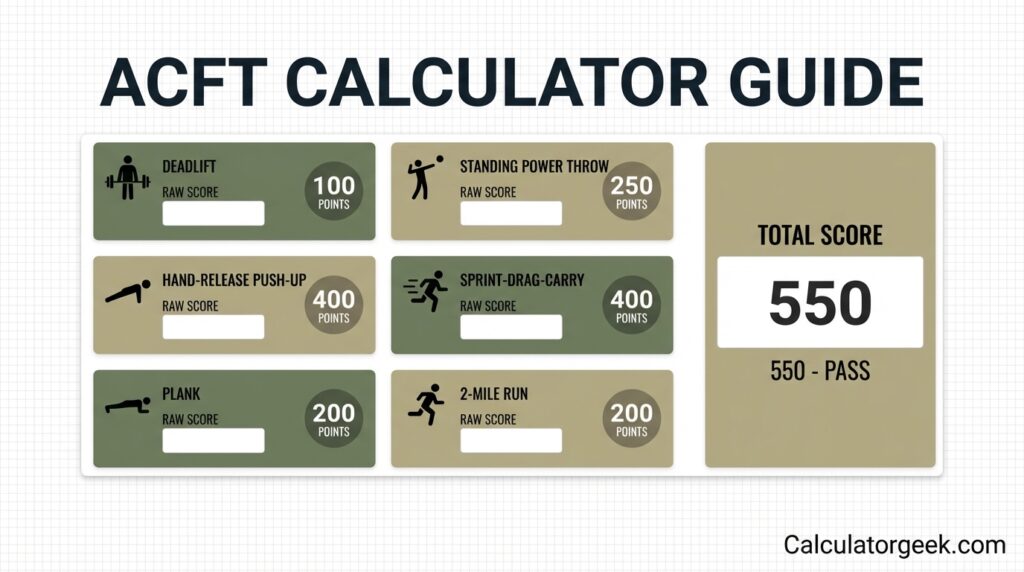
Automatically calculate your ACFT points, pass/fail status, and event breakdown as you type.
Calculator usage
You’re using: —
Counts are global across CalculatorGeek.
The ACFT Calculator helps you estimate your U.S. Army Combat Fitness Test (ACFT) points by event and your total score from the performance numbers you enter. It’s built for informational use: planning training, tracking progress over time, and spotting input mistakes that can distort your score.
The ACFT replaced the older APFT as the Army’s primary fitness test in October 2020. In June 2025, the Army transitioned again to the newer Army Fitness Test (AFT) standard. Even so, many people still reference ACFT results in training logs, coaching, and historical comparisons—so having a consistent ACFT Calculator method helps keep your records readable and comparable.
Body composition rules may also apply separately from fitness test scoring, so treat this calculator as one part of readiness tracking—not a complete eligibility check.
Key Takeaways
- The ACFT Calculator converts each ACFT event result into points, then sums them into a total score.
- Most “wrong score” issues come from unit mistakes (lb vs kg, meters vs feet) or time format errors (mm:ss vs seconds).
- ACFT scoring is event-by-event; improving one event can raise your total even if others stay the same.
- Track progress fairly by keeping the same measurement method every time (same units, same rounding, same test setup).
- Use a quick sanity check: if your input looks unrealistic for the event, your points will be unrealistic too.
- If two tools disagree, compare their scoring tables version, rounding rules, and unit conversions.
- The best training target is often the event with the highest point return per week, not the event you dislike most.
- A calculator estimate is useful for planning, but official scores come from official test administration.
ACFT Calculator overview
An ACFT Calculator estimates your U.S. Army Combat Fitness Test points per event and your total score based on the numbers you enter. It’s mainly a planning tool: it helps you set training priorities, track improvement, and catch input mistakes before they skew your score.
Q: What does an ACFT Calculator do?
A: It turns each event result into points and adds them into one total score.
What the ACFT Calculator shows (outputs)
- Points for each event (based on the scoring tables the calculator uses).
- Total ACFT score (sum of event points).
- A clearer “before vs after” comparison when you retest.
What you must enter (inputs)
- Deadlift: weight (use the correct unit).
- Power throw: distance (use the correct unit).
- Hand-release push-ups: counted reps.
- Sprint-drag-carry: time (enter in the required format).
- Plank: time.
- 2-mile run: time.
Quick definitions (1–2 lines)
- Event points: points earned for one ACFT event from your performance.
- Total score: sum of points across all events.
- Time format: how you enter time (usually mm:ss); mismatches cause wrong points.
What is the Army Combat Fitness Test
The Army Combat Fitness Test (ACFT) is the U.S. Army’s multi-event physical fitness assessment that measures several fitness qualities instead of relying on only a few exercises. It uses multiple events to reflect strength, power, muscular endurance, speed/agility under load, core endurance, and aerobic endurance.
Q: What is the ACFT?
A: A U.S. Army fitness test with multiple events that score different physical capabilities.
Why the ACFT was introduced (plain language)
- To evaluate a broader set of physical abilities than the older three-event format.
- To connect fitness testing to common physical demands like lifting, carrying, sprinting, and sustained running.
- To discourage “one-skill” preparation by spreading scoring across multiple event types.
What the ACFT is not
- Not a medical clearance, injury-risk prediction, or guarantee of eligibility for a role.
- Not a replacement for separate body composition requirements if those apply to you.
- Not a substitute for official test administration and official score reporting.
ACFT events explained
The ACFT includes six events, each with its own measurement type (weight, distance, reps, or time). An ACFT Calculator is only as accurate as the event inputs you enter, so the main goal is matching the right result to the right event field.
Q: How many ACFT events are there?
A: Six.
The 6 ACFT events (what to enter)
- 3-Repetition Maximum Deadlift (3RM DL)
Enter: the heaviest weight you lifted for 3 reps. - Standing Power Throw (SPT)
Enter: the throw distance (recorded from the correct start line to landing point). - Hand-Release Push-Up (HRP)
Enter: the number of valid reps completed within the event standard. - Sprint-Drag-Carry (SDC)
Enter: your time (use the format the calculator requests). - Plank (PLK)
Enter: your hold time. - Two-Mile Run (2MR)
Enter: your run time.
Quick definitions (1–2 lines)
- Valid rep: a repetition counted only if it meets the event movement standard.
- Timed event: an event measured in minutes/seconds where format and rounding can change points.
Fast input checklist (avoid the top 4 errors)
Enter your training log result, not a “best guess.”
Confirm units before typing (lb/kg, meters/feet).
Use exact time format (mm:ss unless the field asks for seconds).
Don’t mix up timed events (SDC vs 2-mile run).
ACFT scoring system
ACFT scoring assigns points per event based on your performance, then adds those points into one total ACFT score. An ACFT Calculator does the same thing digitally: it matches each input to the scoring table for that event and totals the points.
Q: How does ACFT scoring work?
A: Points for each event are calculated from your performance, then summed into a total score.
How points are produced (human-readable logic)
- You enter a performance for an event (example: a time, reps, distance, or weight).
- That performance is matched to a points value using the event’s scoring table.
- The calculator repeats this for all six events.
- The total score is the sum of all event points.
What affects your score the most
- Cutoff sensitivity: If your performance is near a points cutoff, small rounding differences can change your points.
- Time-entry precision: A few seconds in SDC or the run can swing points quickly compared with small changes in weight or distance.
- Validity rules: For rep-based events, only valid reps count—partial reps can reduce your entered number and your points.
Quick definitions
- Scoring table: a chart that maps performance values to points.
- Total score: the sum of points across all events.
- Minimum standard: the lowest performance required for a passing outcome (policy-dependent).
Proper techniques for the Army ACFT chart
To use an Army ACFT chart correctly, match the right event + right unit + right time format before you look up points. Most chart mistakes happen when people read the right row in the wrong event, or convert units incorrectly.
Q: How do I read an ACFT score chart correctly?
A: Pick the correct event first, then confirm units and time format, then match your exact result to the points row.
Technique 1: Lock the event before the number
- Verify you’re in the correct column: Deadlift ≠ Run ≠ SDC.
- If your chart has multiple event panels, don’t “carry over” assumptions from the last panel.
Technique 2: Standardize units (don’t mix systems mid-lookup)
- Weight: lb OR kg, not both.
- Distance: m OR ft/in, not both.
- If you convert, convert once and write the converted number down before you look up points.
Technique 3: Use exact time entries (cutoff-safe)
- Enter time as mm:ss consistently (example:
02:18). - Avoid rounding unless your record is already rounded.
- If you’re near a cutoff, treat 1–3 seconds as meaningful.
Technique 4: Read the chart like a decision tree
- Event → 2) Unit/time format → 3) Your exact result → 4) Points
If you skip step 2, the lookup is usually wrong.
Technique 5: Sanity-check the result before trusting it
- If your points jump unexpectedly, recheck:
- swapped times (SDC vs 2-mile)
- unit toggle (lb/kg)
- distance format (m vs ft/in)
Q: Why does the chart give me “crazy points”?
A: Almost always because the input meaning is wrong (unit/time format), not because the chart is broken.
What are the ACFT standards?
ACFT standards are commonly grouped into three minimum point requirements tied to the physical demands of a role. In practice, this means your results are evaluated by whether you meet a minimum points-per-event threshold for the category used.
Q: What are ACFT standards?
A: Minimum points required in each event, based on the category applied.
Minimum points by category (per event)
- Heavy-demand roles: 70 points required in each event.
- Significant-demand roles: 65 points required in each event.
- Moderate-demand roles: 60 points required in each event.
Many score checks treat 60 points per event as the baseline minimum to “pass” overall (because missing one event minimum can fail the outcome even if the total looks fine).
Q: Do ACFT minimums depend on age or sex?
A: These category minimums are applied by role demand category rather than age/sex, unlike older test formats.
| Category | Min points (each event) | MDL [lb] | SPT [m] | HRP | SDC | LTK | PLK | 2MR |
|---|---|---|---|---|---|---|---|---|
| Heavy job | 70 | 200 | 8.0 | 30 | 2:10 | 5 | 2:42 | 18:00 |
| Significant job | 65 | 180 | 6.5 | 20 | 2:30 | 3 | 2:26 | 19:00 |
| Moderate job | 60 | 140 | 4.5 | 10 | 3:00 | 1 | 2:09 | 21:00 |
Preparing for ACFT-style testing (practical, safe basics)
- Build a training plan that includes strength, power, repetition endurance, and running—not just one area.
- Use submaximal sessions most days and add intensity gradually to reduce injury risk.
- Retest on a consistent schedule (every 4–8 weeks) and keep inputs consistent in your ACFT Calculator.
- Technique matters: improving form (deadlift mechanics, efficient pacing, clean reps) can raise results without “extra” effort.
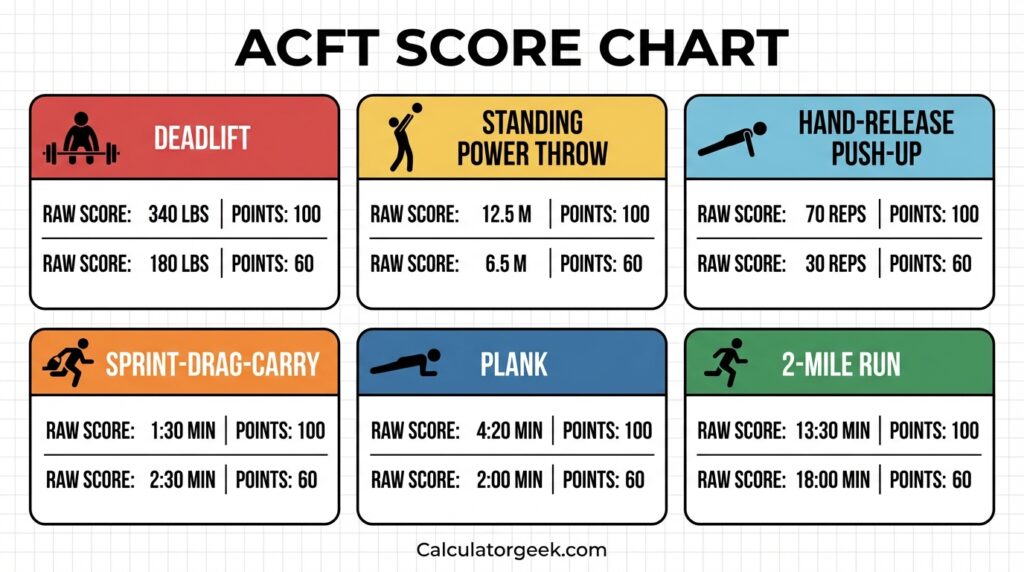
ACFT score chart
An ACFT score chart is a simplified view of how event performance converts into points. In an ACFT Calculator, the score chart (or scoring table) is what turns your raw result into the points you see.
Q: What is an ACFT score chart used for?
A: To look up how a performance translates to points for each event.
How to read a score chart accurately
- Select the correct event first.
- Verify units (weight and distance).
- Use the exact time format required for timed events.
- Avoid rounding unless your test record rounds the same way.
Why score charts and tools can disagree
- Different rounding rules for time-based events.
- Different assumptions about units (automatic conversion vs manual entry).
- Different scoring table versions or formatting.
What is a good ACFT score
A good ACFT score is one that meets required minimums for every event and fits your purpose—passing, improving, or benchmarking within your training group. The most useful “good score” is also repeatable across test days, not just a one-time peak.
Q: What is a good ACFT score?
A: A score that clears event minimums and supports your goal (pass, improve, or compare).
“Good” depends on your goal (use this quick guide)
- Good for passing: You reliably meet minimum standards across all six events.
- Good for improvement: Your total score increases over time, and your weakest event is trending up.
- Good for balance: No single event is dramatically lower than the others.
- Good for readiness: Your performance holds up even with normal day-to-day variation (sleep, weather, stress).
How to use your ACFT Calculator to judge “good”
- Compare your current results to your last two attempts (trend beats one-day spikes).
- Identify the lowest-point event and the highest-return event (often time-based).
- Set one short cycle goal (2–6 weeks) for one event, then retest.
Simple score-quality checklist
- Did you use the same event setup (lane length, surface, equipment)?
- Did you record times consistently (stopwatch method, rounding)?
- Are your entered units correct (lb/kg, meters/feet)?
- Are rep counts based on valid reps, not “attempted” reps?
Who should use an ACFT Calculator
An ACFT Calculator is useful for U.S. Army ACFT preparation, training logs, and coaching because it turns raw performances into estimated points and a total score. It helps you decide what to train next and how much improvement in one event might change your overall score.
Q: Who should use an ACFT Calculator?
A: Anyone tracking ACFT event results and wanting estimated points and a total score.
Best-fit situations
- You’re preparing for an ACFT-style test and want to track improvements by event.
- You coach or train with others and want a consistent way to compare results.
- You’re deciding which event to prioritize based on point impact.
- You want to prevent avoidable errors (wrong unit, wrong time format, swapped events).
When an ACFT Calculator is not enough
- When you need an official score for record purposes (use official administration and official reporting).
- When your event setup is nonstandard (different distances, equipment, or timing method).
- When you don’t have reliable measurements (estimated distances, guessed times, inconsistent rep counting).
Quick note on context
An ACFT Calculator supports planning and consistency. It does not confirm eligibility, selection, or medical readiness on its own.
What you need before you calculate
To get an accurate estimate, your ACFT Calculator inputs should match how results are recorded during testing or in a consistent training log. Most scoring confusion comes from missing details (units, time format, or which number is official).
Q: What do I need to use an ACFT Calculator?
A: Your event results (weight, distance, reps, and times) recorded in the correct units.
Your pre-calc checklist (use this every time)
- A single result for each of the 6 events (no “best of three” mixing unless your log is built that way).
- Weight unit chosen: pounds (lb) or kilograms (kg).
- Distance unit chosen: meters (m) or feet/inches (ft/in).
- Time format confirmed: mm:ss (recommended) or total seconds—match the calculator field.
- Rep counting method: only count reps you’re confident meet the standard.
Measurement tips that prevent wrong totals
- For timed events, record times immediately as mm:ss (example: 02:18).
- For distance, record the exact number, not “about 9 meters.”
- For weight, write down the full load used (including plates), not just “two plates.”
Quick definitions (1–2 lines)
- Official entry: the number you would use on a score sheet (not a rough estimate).
- Comparable result: a result recorded with the same units and method as prior tests.
How to use the ACFT Calculator step by step (based on the Calculatorgeek tool)
To use the ACFT Calculator on Calculatorgeek, you set your goal settings first, then enter each event score in the correct unit format. The calculator updates your points, pass/fail status, and event breakdown automatically as you type.
Q: How do I use the ACFT Calculator on Calculatorgeek?
A: Choose your unit type and core event option, enter each event result, then copy/share your outputs.
Step-by-step (exact tool flow)
- Open the ACFT Calculator page
You’ll see two main areas: Goal (settings) and Scores (event inputs), with Results below. - Set your “Unit type” (Goal section)
Select one of: Heavy / Significant / Moderate.
This setting changes the minimum points required per event in the calculator’s logic. - Choose the core event option (Goal section)
Under “During the test I perform a…”, select Leg tuck or Plank.
The calculator scores one core option based on your selection. - Enter Deadlift (Scores section)
- Choose kg or lb (toggle beside the field).
- Enter your maximum deadlift weight (the tool notes you can repeat up to three times).
- Enter Standing Power Throw distance
- Choose your preferred distance format (the tool supports multiple formats like m/cm, ft/in, etc.).
- Enter the throw distance.
- Use the “Extra” distance inputs if the selected unit format requires it (the tool indicates the format depends on your unit selection).
- Enter Hand-Release Push-Ups
Enter your push-up count (the tool labels it as reps per 2 minutes). - Enter Sprint-Drag-Carry time
Enter the time for the 5 × 50 meter shuttles sequence (sprint, drag, lateral, carry, sprint).
Tip: use the same time format you record in your log so comparisons stay consistent. - Enter your core event score (Leg tuck or Plank)
- If you selected Leg tuck: enter reps.
- If you selected Plank: enter how long you held the plank (time).
- Enter Two-Mile Run time
Enter your 2-mile run time (the tool describes it as a flat outdoor course). - Review the Results section (auto-updates)
The Results area updates as you type and shows:
- Score (points)
- Your event breakdown
- Pass/fail status (based on meeting minimums in every event)
- Copy, share, or reset (optional)
- Use Copy all outputs to copy the results.
- Use Share result to share a link; you can toggle Include my inputs in the share link.
- Use Clear all to reset entries instantly.
Fast “result looks wrong” check (10 seconds)
- Did you pick the correct Unit type (Heavy/Significant/Moderate)?
- Did you select the correct core event (Leg tuck vs Plank) before entering that score?
- Are your deadlift units correct (kg vs lb)?
- Did you enter the power throw in the correct distance format for your selected units?
ACFT Calculator formula
An ACFT Calculator produces a total score by assigning points to each event, then adding those points together. The “formula” is simple, but the scoring step depends on event-specific point tables.
Q: What is the ACFT Calculator formula?
A: Total score = points from each event added together.
Human-readable formula
- Deadlift points = lookup(weight)
- Power throw points = lookup(distance)
- HRP points = lookup(reps)
- SDC points = lookup(time)
- Core points = lookup(plank time or leg tuck reps)
- 2-mile run points = lookup(time)
Total ACFT score =
Deadlift + Power Throw + HRP + SDC + Core + 2-Mile Run
What “lookup()” means (quick definition)
- lookup(): find the points value that corresponds to your exact performance in the event’s scoring table.
Important calculation notes (where errors happen)
- Timed events are sensitive: a few seconds can change points more than you expect.
- Near cutoffs: rounding and time format (mm:ss vs seconds) can move you across a points boundary.
- Core event choice: if your calculator supports two core options, your total uses the one you selected (not both).
ACFT scorings in practice
ACFT scoring can feel abstract until you see a full, end-to-end example. Below is a practical walk-through showing how an ACFT Calculator turns event results into points and a total score for a specific goal.
Q: Can you show an ACFT scoring example?
A: Yes—here’s a full example with category selection, event points, and total score.
Practical example (Significant-demand category)
Dave is preparing for a significant physically demanding role category. He wants to confirm whether his current performance meets the minimum standard and what his total score looks like.
Step 1: Choose the category
- Category selected: Significant (minimum 65 points per event)
Step 2: Enter event results (with points)
- MDL: 210 lb → 72 points
- SPT: 9 m → 76 points
- HRP: 28 reps → 69 points
- SDC: 2:00 → 80 points
- Core:Leg tuck selected (Plank not used)
- LTK: 12 reps → 84 points
- 2MR: 16:30 → 80 points
Step 3: Total score
- Total: 72 + 76 + 69 + 80 + 84 + 80 = 461 points
Result interpretation (what this means)
- Dave meets the per-event minimum in all events for his selected category.
- His ACFT Calculator total is 461 points, and he clears all parts for that category based on these entries.
Decision-support guide
Use an ACFT Calculator to decide what to train next by focusing on the event that gives you the biggest score improvement for the least time investment. The best decision is usually “highest points return,” not “hardest event.”
Q: How do I use an ACFT Calculator to choose what to improve?
A: Compare point gains from small improvements in each event, then prioritize the biggest return.
The 3-step decision method (simple and repeatable)
- Identify your “lowest points” event
This is your biggest vulnerability if you’re trying to meet minimums consistently. - Identify your “highest return” event
Test a realistic improvement (example: +5 reps, +0.5 m, +10 lb, −10 seconds) and see which event adds the most points. - Pick one priority for a short cycle (2–6 weeks)
Improve one event while maintaining the others. Retest and repeat.
Mini framework: Pick your priority track
- Passing-first track (risk reduction)
Focus on the event closest to minimum standards. Stabilize it before chasing total score. - Score-growth track (fast total points)
Focus on the event where small improvements create big point gains (often time-based). - Balance track (even profile)
Raise your lowest two events until your points are within a similar range across events.
| Your situation | Best next focus | Why it works | Avoid |
|---|---|---|---|
| One event is near minimum | Train that event first | Reduces fail risk even if total is decent | Chasing total points while ignoring the weak link |
| Total is okay but you want faster gains | Target highest-return event | Small improvements add noticeable points | Spreading effort across all events at once |
| Two events lag far behind | Alternate focus in short blocks | Improves overall balance without losing momentum | Only practicing your strongest event |
| You’re consistent but plateaued | Fix the limiter (grip, pacing, core) | Removes the constraint holding multiple events back | Random workouts with no measurable progression |
Practical next-step checklist (use with your calculator)
- Run 3 “what-if” tests in the ACFT Calculator:
- Timed event: improve by 5–15 seconds
- Rep event: improve by 3–10 reps
- Strength/power: add a small, realistic increment
- Pick the change that increases points the most.
- Train that target for 2–6 weeks, then retest.
Common mistakes and edge cases
Most ACFT Calculator errors come from input interpretation, not from the scoring idea itself. If your score looks surprising, assume an entry mismatch first—unit, time format, swapped fields, or an unrealistic value.
Q: Why is my ACFT Calculator score wrong?
A: Usually because of a unit/time format issue or a swapped event input.
Common mistakes (fix these first)
- Time format mismatch (biggest issue)
Entering218instead of02:18, or mixing mm:ss with seconds. - Wrong unit selection
Deadlift entered in lb while the calculator expects kg (or vice versa). - Distance conversion errors
Power throw entered in feet when the field expects meters, or using the “extra” distance field incorrectly. - Swapped timed events
Putting your 2-mile run time into SDC (or the other way around). - Counting attempted reps instead of valid reps
For HRP, only reps meeting the movement standard should be entered. - Rounding inconsistently
Rounding run times “down” sometimes and “up” other times breaks comparisons.
Edge cases (where careful entry matters)
- Performance near a cutoff
If you’re close to a points boundary, even a small rounding change can shift points. - Mixed logging styles
One day you log SDC as seconds, another day as mm:ss; the calculator will treat them differently. - Nonstandard setup during training
Different lane length, surface, or equipment can make your training numbers non-comparable to a test-like entry. - Changing the core event option after entering data
If you switch between plank and leg tuck (when available), the calculator expects different input types and your “core score” can appear to vanish.
Quick “mistake scan” checklist
- Did I confirm unit toggles (lb/kg and distance format)?
- Are all timed fields entered in the same time format?
- Did I enter each result under the correct event name?
- Do the values look physically realistic?
Timelines requirements and documents
For ACFT planning, the most practical “timeline” is your training-to-retest cycle and the record-keeping that makes your results comparable. An ACFT Calculator helps most when you log consistently and retest on a predictable schedule.
Q: How often should I retest using an ACFT Calculator?
A: Often enough to measure progress (typically every few weeks), but not so often that fatigue or learning effects distort trends.
Practical retest timelines (training-friendly)
- 2–4 weeks: best for improving technique, pacing, and event familiarity.
- 4–8 weeks: best for measurable strength and endurance improvements.
- 8–12 weeks: best for larger score changes and more stable event balance.
What to record each time (minimum documentation)
- Date of test or training trial
- Your six event results (including units and exact time format)
- Notes on conditions that affect comparability:
- surface (track vs road), weather, footwear
- equipment differences
- whether reps were judged/validated by another person
“Documents” you should keep (simple and useful)
- Personal score log: one line per test attempt, same format each time.
- Unit conversion notes: if you switch between unit systems, record the conversion method you used.
- Core option note (if applicable): plank vs leg tuck selection for that log entry.
Requirement note (important boundary)
An ACFT Calculator is not an official score document. If you need official outcomes, rely on official test administration and reporting systems.
Limitations and disclaimers
An ACFT Calculator can estimate points and totals from the numbers you enter, but it cannot guarantee an outcome or replace official testing. Treat the result as informational and verify anything that affects official decisions through official processes.
“Tools information on Calculatorgeek is provided for general guidance and educational purposes only.”
Key limitations (plain and practical)
- Calculator outputs depend on the scoring tables and rules used by the tool.
- Inputs recorded under nonstandard conditions may not match test-day outcomes.
- Unit conversion and rounding differences can change points near cutoffs.
- Rep validity depends on movement standards that a calculator cannot judge.
Ad & Content Safety Note
This content is informational and designed for general fitness tracking and planning. It does not provide medical advice, legal advice, or guarantees about eligibility or outcomes. Advertisements on the page do not change how the calculator works or how guidance is written.
Author and reviewer
This ACFT Calculator guide was prepared to help readers understand ACFT scoring logic, input requirements, and common pitfalls when estimating results.
Author
Name: Jordan Miles
Credential: MBA (Finance)
Role: Editor
Reviewer
Name: Avery Chen
Credential: CPA (Certified Public Accountant)
Role: Content Reviewer
FAQs (regenerated — most important only)
Q: How do I pass the ACFT Calculator score check?
A: Use the ACFT Calculator to confirm you meet the minimum points in every event for your selected category, then train the weakest event first until it’s comfortably above the minimum.
Q: What is a good ACFT score?
A: A good ACFT score is one that meets minimums in all events and matches your goal (pass reliably, improve over time, or benchmark against your peer group).
Q: Is the ACFT currently in effect? (ACFT or APFT: Which test is currently used?)
A: The Army moved from APFT to ACFT in 2020 and later transitioned to the newer AFT standard in 2025. Use ACFT scoring mainly for training logs, comparisons, and historical tracking if your unit references it.
Q: What is the primary purpose of the ACFT (and why was it created)?
A: To evaluate multiple fitness qualities—strength, power, endurance, speed/agility, and core capacity—rather than focusing on only a few exercises.
Q: How long does it take to complete the ACFT?
A: Total time depends on group size, lane setup, rest periods, and event flow. Plan for a full testing window rather than trying to estimate a single fixed duration.
Q: Is the ACFT hard?
A: It can be challenging because it tests several different abilities. It feels “hard” when one event lags behind the others or when pacing and technique are inconsistent.
Q: How can I prepare for the ACFT?
A: Train all categories each week: (1) deadlift strength, (2) power throw mechanics, (3) push-up endurance, (4) sprint-drag-carry conditioning, (5) core endurance, (6) run pacing. Retest every 4–8 weeks using the same input method in your ACFT Calculator.
Q: Who is qualified to grade the ACFT, and where are scores posted?
A: Official grading and score posting are handled through official Army processes at the unit/testing level, and requirements can vary by policy and installation—confirm locally for the most current procedure.
REFERENCES
U.S. Army — Army Fitness Test (AFT) transition / test-of-record guidance (official announcement or policy update).
U.S. Army / Department of the Army — ACFT overview and event descriptions (official ACFT resource).
Department of the Army — ACFT scoring standards / score scale tables (official publication or manual).
TRADOC / Army training publication — ACFT event technique and administration guidance (official training document).