

ACFT Calculator
Automatically calculate your ACFT points, pass/fail status, and event breakdown as you type.
Calculator usage
You’re using: —
Counts are global across CalculatorGeek.
CalculatorGeek provides a score estimate for planning, comparison, and historical ACFT interpretation. Official outcomes depend on official test administration, scoring, and Army policy.
Use this ACFT Calculator to estimate your Army Combat Fitness Test points by event and total score from the performance numbers you enter. This tool is best for historical ACFT score tracking, training planning, coaching, and retest comparison. It uses your deadlift weight, standing power throw distance, hand-release push-up reps, sprint-drag-carry time, core event result, and 2-mile run time to generate an event-by-event score breakdown, total score, and pass/fail-style result based on the selected standard. Results are score-table-based estimates, not an official Army score report. The Army replaced the ACFT with the Army Fitness Test (AFT) as the official test of record on June 1, 2025, but ACFT scoring remains useful for older records, training logs, and historical comparisons.
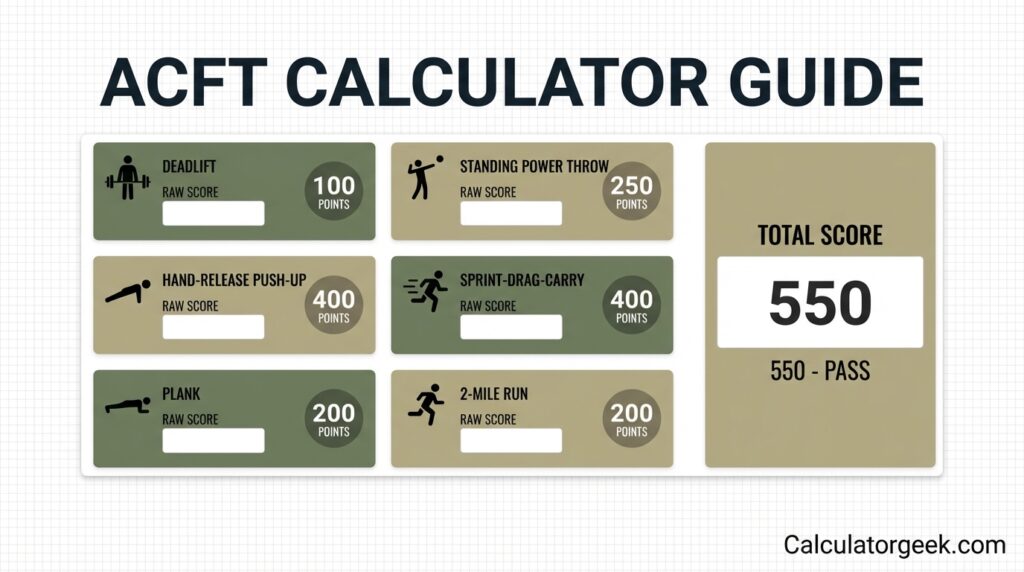
Why trust this page?
This ACFT Calculator page is built for historical ACFT score tracking, training analysis, and score comparison. It explains the calculator’s scoring logic in plain English, highlights common input mistakes that can distort results, and reflects the Army’s current fitness-test context, including the shift from the ACFT to the AFT as the official test of record. CalculatorGeek provides score estimates for planning and comparison, while official outcomes depend on official Army test administration and current policy.
ACFT vs AFT: Important Current Context
The Army Combat Fitness Test (ACFT) replaced the APFT in October 2020, but the Army later introduced the Army Fitness Test (AFT) as the new official physical fitness test of record effective June 1, 2025. That means this page is best used for historical ACFT scoring, training logs, comparisons with older records, and understanding ACFT-era event scoring. If you need the current Army standard, use an AFT calculator instead.
You may still need an ACFT Calculator if you are comparing older records, keeping ACFT-based training logs, working with a coach who still references ACFT scoring, or reviewing past performance data that was recorded before the AFT became the official standard.
Key Takeaways
- The ACFT Calculator converts each ACFT event result into points and then adds them into a total score.
- The most common scoring errors come from unit mismatches and time-format mistakes.
- ACFT scoring is event by event, so improving one event can raise your total even if the others stay the same.
- The calculator is best used for planning, tracking, and comparison, not official record scoring.
- The Army now uses the AFT as the official test of record, so ACFT scoring is mainly useful for historical or comparison purposes today.
ACFT Calculator Overview
An ACFT Calculator estimates your U.S. Army Combat Fitness Test points per event and total score from the numbers you enter. It is mainly a planning tool. It helps you track progress across retests, compare event strengths and weaknesses, catch input mistakes before they distort your score, and decide what to improve next.
What does an ACFT Calculator do?
It converts each event result into points and adds those points into one total score.
Who Should Use This Calculator
This ACFT Calculator is most useful for soldiers tracking older ACFT results, coaches reviewing ACFT-era scores, users comparing past performance across test dates, people who want a structured ACFT score estimate from raw event results, and anyone trying to spot input mistakes before relying on a score.
This calculator is not enough on its own when you need an official Army score document, current AFT-based scoring, eligibility confirmation, body-composition compliance confirmation, or a judgment on rep quality and official event administration.
What the ACFT Calculator Shows
Outputs
The calculator should return these results in clear, crawlable form:
- Deadlift points
- Standing power throw points
- Hand-release push-up points
- Sprint-drag-carry points
- Core event points
- 2-mile run points
- Total ACFT score
- Pass/fail-style score check
- Event-by-event score breakdown
- Retest comparison value when you update inputs
Quick definitions
Event points
Points earned for one event based on your performance.
Total ACFT score
The sum of the points from all six events.
Pass/fail-style result
A simple check showing whether your entered performances meet the minimum threshold used by the calculator.
Breakdown
A clearer view of which event is strongest, weakest, or closest to the minimum.
What You Must Enter
To use the calculator correctly, you need one result for each ACFT event:
- Deadlift: weight
- Standing power throw: distance
- Hand-release push-ups: valid reps
- Sprint-drag-carry: time
- Core event: reps or hold time, depending on selection
- 2-mile run: time
Before you calculate
Make sure you have the correct weight unit selected, the correct distance unit selected, the correct time format selected, valid reps rather than attempted reps, and results recorded the same way as your past logs if you want a fair comparison.
What Is the Army Combat Fitness Test?
The Army Combat Fitness Test (ACFT) was the Army’s multi-event physical fitness assessment designed to measure more than one quality of fitness. Instead of focusing on only a few exercises, it covered strength, power, muscular endurance, speed/agility under load, core endurance, and aerobic endurance.
What is the ACFT?
A six-event Army fitness test that converts event performance into points across multiple physical capacities.
What the ACFT was designed to do
- Evaluate a broader range of physical abilities
- Connect testing more closely to lifting, carrying, sprinting, and running demands
- Reduce one-skill preparation by spreading scoring across several event types
What the ACFT was not
- Not a medical clearance
- Not an injury-risk guarantee
- Not a substitute for separate body-composition requirements
- Not a replacement for official test administration or official reporting
ACFT Events Explained
The ACFT includes six events, each measured differently. An ACFT Calculator is only as accurate as the values you enter, so it is important to match the right result to the right field.
The 6 ACFT events
3-Repetition Maximum Deadlift (3RM DL)
Enter the heaviest weight you lifted for 3 reps.
Standing Power Throw (SPT)
Enter the throw distance.
Hand-Release Push-Up (HRP)
Enter the number of valid reps.
Sprint-Drag-Carry (SDC)
Enter your time in the correct format.
Core event
Enter either the selected reps or hold time.
Two-Mile Run (2MR)
Enter your run time.
Common input mistakes
- Using pounds when the tool is set to kilograms
- Using feet when the field expects meters
- Entering raw seconds instead of mm:ss
- Mixing up SDC and 2-mile run times
- Counting attempted reps instead of valid reps
How ACFT Scoring Works
ACFT scoring assigns points to each event based on your performance, then sums those points into a total score. The calculator does the same thing digitally by matching your input to the scoring table for that event.
How does ACFT scoring work?
Each event result is converted into points, and the six event scores are added together.
Human-readable scoring logic
- You enter a performance result for one event.
- That result is matched to a point value using the event’s scoring table.
- The process repeats for all six events.
- The calculator adds the points into a total ACFT score.
What affects your score most
- Cutoff sensitivity
- Time-entry precision
- Rep validity
- Consistency in units, logging style, and setup
How to Read an ACFT Score Chart Correctly
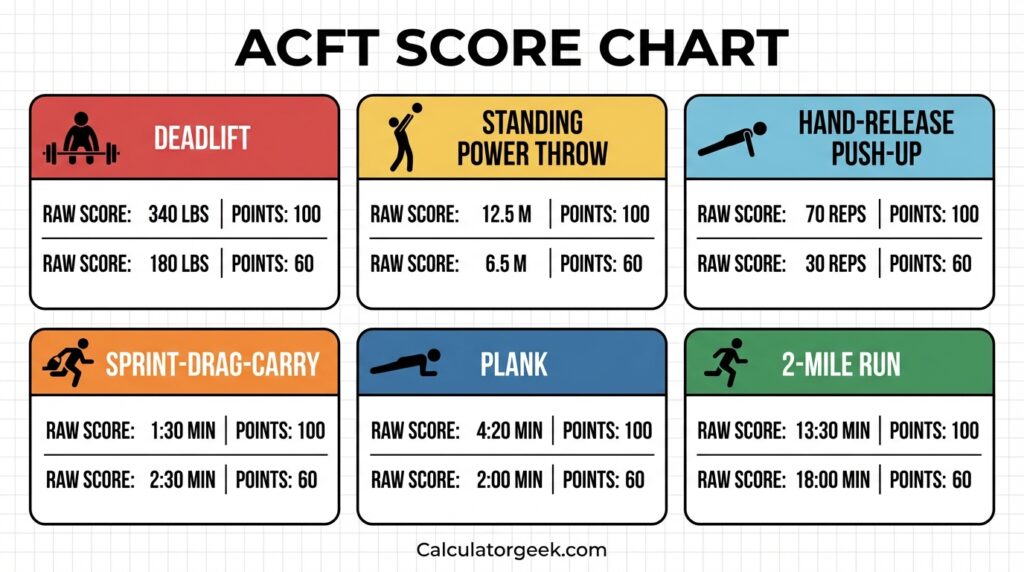
To use an ACFT score chart or calculator correctly, confirm the event, unit, and time format before trusting the score. Most surprising results come from interpretation errors, not from the scoring idea itself.
Use this order
- Pick the correct event
- Confirm the unit system
- Confirm the time format
- Match your exact result to the scoring row
- Sanity-check the result before trusting it
ACFT Standards
ACFT standards are commonly grouped into three minimum point requirements tied to physical-demand categories. In practical use, this means the calculator checks whether each event meets the minimum points threshold for the selected category.
Minimum points by category
- Heavy-demand roles: 70 points in each event
- Significant-demand roles: 65 points in each event
- Moderate-demand roles: 60 points in each event
Standards snapshot
Standards snapshot
Minimum points and example benchmark values by category.
| Category | Minimum points per event | MDL | SPT | HRP | SDC | LTK | PLK | 2MR |
|---|---|---|---|---|---|---|---|---|
| Heavy job | 70 | 200 lb | 8.0 m | 30 | 2:10 | 5 | 2:42 | 18:00 |
| Significant job | 65 | 180 lb | 6.5 m | 20 | 2:30 | 3 | 2:26 | 19:00 |
| Moderate job | 60 | 140 lb | 4.5 m | 10 | 3:00 | 1 | 2:09 | 21:00 |
How to Use the ACFT Calculator on CalculatorGeek
To use the ACFT Calculator on CalculatorGeek, choose your settings first, then enter each event result in the correct unit and format. The calculator updates your points, pass/fail-style result, and event breakdown automatically.
Step by step
- Open the calculator page.
- Select your standard type.
- Choose the core event option.
- Enter deadlift weight.
- Enter standing power throw distance.
- Enter hand-release push-up reps.
- Enter sprint-drag-carry time.
- Enter core-event result.
- Enter 2-mile run time.
- Review the results.
Fast “score looks wrong” check
Are all timed fields entered consistently?
Did you choose the correct category?
Did you choose the correct core event?
Are your deadlift units correct?
Is your power throw distance in the correct format?
ACFT Calculator Formula
The formula is straightforward: each event gets a points value, and the total score is the sum of those six point values. The variable part is the scoring-table lookup for each event.
What is the ACFT Calculator formula?
Total score = points from each event added together.
Human-readable formula
- Deadlift points = lookup(weight)
- Power throw points = lookup(distance)
- HRP points = lookup(reps)
- SDC points = lookup(time)
- Core points = lookup(reps or hold time)
- 2-mile run points = lookup(time)
Total ACFT score = Deadlift + Power Throw + HRP + SDC + Core + 2-Mile Run
Example: ACFT Scoring in Practice
Example 1: Significant-demand category
Dave is preparing for a significant physical-demand category and wants to know whether his performance clears the minimums.
Inputs
- MDL: 210 lb
- SPT: 9 m
- HRP: 28 reps
- SDC: 2:00
- Core: 12 reps
- 2MR: 16:30
Sample output
- MDL: 72 points
- SPT: 76 points
- HRP: 69 points
- SDC: 80 points
- Core: 84 points
- 2MR: 80 points
- Total: 461 points
What it means
He clears the per-event minimums for that category and has a solid total with no obvious single-event failure risk.
Example 2: Good total but weak-event risk
A user may have a decent overall score but still be close to the minimum in one event. That matters because event-level minimums can still determine the outcome. Focus first on the weakest event, not just the total.
Example 3: Wrong score because of time-format error
If a user enters 218 instead of 02:18, the timed-event points can look wildly wrong. This is one of the most common calculator-entry errors.
Example 4: Wrong score because of unit mismatch
If a deadlift value is entered in pounds while the calculator expects kilograms, the score will be distorted. Always verify the unit toggle first.
Example 5: Fair retest comparison
When you use the same units, same rounding approach, and similar setup each time, the calculator becomes much more useful for trend tracking and coaching decisions.
How to use the ACFT Calculator step by step (based on the Calculatorgeek tool)
To use the ACFT Calculator on Calculatorgeek, you set your goal settings first, then enter each event score in the correct unit format. The calculator updates your points, pass/fail status, and event breakdown automatically as you type.
Q: How do I use the ACFT Calculator on Calculatorgeek?
A: Choose your unit type and core event option, enter each event result, then copy/share your outputs.
Step-by-step (exact tool flow)
- Open the ACFT Calculator page
You’ll see two main areas: Goal (settings) and Scores (event inputs), with Results below. - Set your “Unit type” (Goal section)
Select one of: Heavy / Significant / Moderate.
This setting changes the minimum points required per event in the calculator’s logic. - Choose the core event option (Goal section)
Under “During the test I perform a…”, select Leg tuck or Plank.
The calculator scores one core option based on your selection. - Enter Deadlift (Scores section)
- Choose kg or lb (toggle beside the field).
- Enter your maximum deadlift weight (the tool notes you can repeat up to three times).
- Enter Standing Power Throw distance
- Choose your preferred distance format (the tool supports multiple formats like m/cm, ft/in, etc.).
- Enter the throw distance.
- Use the “Extra” distance inputs if the selected unit format requires it (the tool indicates the format depends on your unit selection).
- Enter Hand-Release Push-Ups
Enter your push-up count (the tool labels it as reps per 2 minutes). - Enter Sprint-Drag-Carry time
Enter the time for the 5 × 50 meter shuttles sequence (sprint, drag, lateral, carry, sprint).
Tip: use the same time format you record in your log so comparisons stay consistent. - Enter your core event score (Leg tuck or Plank)
- If you selected Leg tuck: enter reps.
- If you selected Plank: enter how long you held the plank (time).
- Enter Two-Mile Run time
Enter your 2-mile run time (the tool describes it as a flat outdoor course). - Review the Results section (auto-updates)
The Results area updates as you type and shows:
- Score (points)
- Your event breakdown
- Pass/fail status (based on meeting minimums in every event)
- Copy, share, or reset (optional)
- Use Copy all outputs to copy the results.
- Use Share result to share a link; you can toggle Include my inputs in the share link.
- Use Clear all to reset entries instantly.
Fast “result looks wrong” check (10 seconds)
- Did you pick the correct Unit type (Heavy/Significant/Moderate)?
- Did you select the correct core event (Leg tuck vs Plank) before entering that score?
- Are your deadlift units correct (kg vs lb)?
- Did you enter the power throw in the correct distance format for your selected units?
How to Decide What to Improve Next
One of the best uses of an ACFT Calculator is deciding what to train first. The smartest target is often the event that gives you the biggest point increase for the least realistic improvement.
Simple 3-step method
- Identify your lowest-scoring event
- Test a realistic improvement in each weak event
- Train the event with the highest points return first
Practical rule
- If one event is near minimum, train that event first
- If your total is okay but you want faster gains, target the event where small improvements add the most points
- If two events lag badly, rotate attention in short blocks rather than spreading effort too thin
Common Mistakes and Edge Cases
Most ACFT Calculator errors come from input interpretation, not from the scoring concept itself. If the score looks strange, assume an entry mismatch first.
Common mistakes
- Entering 218 instead of 02:18
- Using lb instead of kg
- Entering feet when the field expects meters
- Swapping SDC and 2-mile run times
- Counting attempted reps instead of valid reps
- Rounding some times up and others down
Edge cases
- Being very close to a points cutoff
- Using mixed logging formats across different test days
- Testing under nonstandard conditions
- Changing the core event option after entering data
What Is a Good ACFT Score?
A good ACFT score is one that meets the required minimums in every event and matches your goal. For some users, “good” means passing reliably. For others, it means improving steadily or maintaining a balanced profile across all six events.
A practical way to judge “good”
- Good for passing: every event clears the minimum
- Good for improvement: total score is rising across retests
- Good for balance: no event is far below the rest
- Good for readiness: performance remains stable across normal day-to-day variation
How Often Should You Retest?
For planning and progress tracking, the most useful timeline is a repeatable training-to-retest cycle.
Practical retest ranges
- 2 to 4 weeks: technique, pacing, familiarity
- 4 to 8 weeks: strength and endurance improvement
- 8 to 12 weeks: larger score changes and more stable balance across events
What to record every time
- Date of the test or trial
- All six event results
- Units used
- Exact time format
- Notes about conditions, equipment, or judging differences
Limitations and Disclaimers
An ACFT Calculator can estimate points and totals from the values you enter, but it cannot replace official testing, official grading, or current Army policy. Treat the output as informational and verify anything that affects official decisions through official Army processes.
Key limitations
- Outputs depend on the scoring tables and logic used by the tool
- Nonstandard conditions can make training inputs less comparable
- Unit conversion and rounding differences can change points near cutoffs
- Rep validity depends on movement standards a calculator cannot judge
- Body composition or readiness rules may apply separately
General guidance note
This page is for general educational and planning use. It does not provide medical advice, legal advice, or guarantees about eligibility or official outcomes.
Also check our Army body fat calculator.
Next Steps After Your Score
After you calculate your ACFT score:
- Recheck units and time format
- Look at the weakest event, not just the total
- Compare the score with your last two attempts
- Pick one realistic training priority for the next cycle
- Use an AFT calculator if you need the current official Army test standard
- Review body-composition requirements separately if they apply to you
FAQs
What does an ACFT Calculator do?
It converts each ACFT event result into points and adds them into a total score.
Is the ACFT still used in 2026?
The Army uses the AFT as the official test of record now. The ACFT is mainly relevant for historical records, older logs, and comparison use.
What replaced the ACFT?
The Army Fitness Test (AFT) replaced the ACFT as the official Army physical fitness test of record effective June 1, 2025.
Is this calculator official?
No. It is an informational score-estimation and comparison tool, not an official Army scoring or record system.
How accurate is an ACFT Calculator?
It can be accurate for the scoring logic it uses if your units, times, and rep counts are entered correctly. It is still not a substitute for official test administration.
What inputs are required?
You need results for the deadlift, power throw, hand-release push-ups, sprint-drag-carry, core event, and 2-mile run.
Why does my ACFT score look wrong?
Most wrong scores come from unit mismatches, time-format issues, swapped events, or invalid rep counts.
What affects ACFT score the most?
Timed-event precision, cutoff sensitivity, valid reps, and correct unit handling have a big effect on the final result.
What is the difference between ACFT and AFT?
The ACFT was the prior Army fitness test. The AFT is the current official test of record starting June 1, 2025, with updated standards and policy treatment.
Can I still use ACFT scores for comparison?
Yes. ACFT scores are still useful for historical tracking, training logs, and older performance comparisons.
Do body composition rules matter separately?
Yes. Fitness-test scoring and body-composition policy are related in practice but are not the same thing. Verify body-composition rules separately through current official guidance.
How can I prepare better for ACFT-style testing?
Train all key categories: strength, power, rep endurance, sprint-drag-carry conditioning, core endurance, and run pacing. Retest consistently and use the calculator to track trends.
Common mistakes and edge cases
Most ACFT Calculator errors come from input interpretation, not from the scoring idea itself. If your score looks surprising, assume an entry mismatch first—unit, time format, swapped fields, or an unrealistic value.
Q: Why is my ACFT Calculator score wrong?
A: Usually because of a unit/time format issue or a swapped event input.
Common mistakes (fix these first)
- Time format mismatch (biggest issue)
Entering218instead of02:18, or mixing mm:ss with seconds. - Wrong unit selection
Deadlift entered in lb while the calculator expects kg (or vice versa). - Distance conversion errors
Power throw entered in feet when the field expects meters, or using the “extra” distance field incorrectly. - Swapped timed events
Putting your 2-mile run time into SDC (or the other way around). - Counting attempted reps instead of valid reps
For HRP, only reps meeting the movement standard should be entered. - Rounding inconsistently
Rounding run times “down” sometimes and “up” other times breaks comparisons.
Edge cases (where careful entry matters)
- Performance near a cutoff
If you’re close to a points boundary, even a small rounding change can shift points. - Mixed logging styles
One day you log SDC as seconds, another day as mm:ss; the calculator will treat them differently. - Nonstandard setup during training
Different lane length, surface, or equipment can make your training numbers non-comparable to a test-like entry. - Changing the core event option after entering data
If you switch between plank and leg tuck (when available), the calculator expects different input types and your “core score” can appear to vanish.
Quick “mistake scan” checklist
- Did I confirm unit toggles (lb/kg and distance format)?
- Are all timed fields entered in the same time format?
- Did I enter each result under the correct event name?
- Do the values look physically realistic?
Timelines requirements and documents
For ACFT planning, the most practical “timeline” is your training-to-retest cycle and the record-keeping that makes your results comparable. An ACFT Calculator helps most when you log consistently and retest on a predictable schedule.
Q: How often should I retest using an ACFT Calculator?
A: Often enough to measure progress (typically every few weeks), but not so often that fatigue or learning effects distort trends.
Practical retest timelines (training-friendly)
- 2–4 weeks: best for improving technique, pacing, and event familiarity.
- 4–8 weeks: best for measurable strength and endurance improvements.
- 8–12 weeks: best for larger score changes and more stable event balance.
What to record each time (minimum documentation)
- Date of test or training trial
- Your six event results (including units and exact time format)
- Notes on conditions that affect comparability:
- surface (track vs road), weather, footwear
- equipment differences
- whether reps were judged/validated by another person
“Documents” you should keep (simple and useful)
- Personal score log: one line per test attempt, same format each time.
- Unit conversion notes: if you switch between unit systems, record the conversion method you used.
- Core option note (if applicable): plank vs leg tuck selection for that log entry.
Requirement note (important boundary)
An ACFT Calculator is not an official score document. If you need official outcomes, rely on official test administration and reporting systems.
Author
Name: James Carter — Performance content editor specializing in military fitness scoring, training metrics, and calculator methodology
Credential: Fitness calculator content specialist focused on scoring systems, training guidance, and performance education
Role: Editor / Content Lead
Reviewer
Name: Daniel Brooks — Exercise performance reviewer focused on strength-and-conditioning context, scoring clarity, and military fitness content accuracy
Credential: Reviewed for exercise science alignment, strength-and-conditioning context, and military fitness content accuracy
Role: Subject Matter Reviewer
REFERENCES
Official Army AFT standards / scoring document