Sat Score Calculator
SAT-Score-Calculator
Estimate your Digital SAT score from your module correct counts.
People used this calculator
Your current platform: —
Global counter (server-side).
Sat Score Calculator: Estimate Your Digital SAT Score (400–1600)

A Sat Score Calculator estimates your Digital SAT results using how many questions you got right in each module. It’s built for students who want a realistic score estimate after practice tests, parents tracking progress, and anyone planning score goals for admissions—without needing to manually convert raw counts into scaled outcomes.
It also helps you understand why scores aren’t just “percent correct,” especially because the Digital SAT uses module-based adaptivity.
What This Tool Calculates
The Sat Score Calculator estimates your Digital SAT performance using your number of correctly answered questions in each module. Instead of relying on a simple percentage, it reflects how the SAT actually reports results—through scaled section scores and a combined total.
Specifically, the tool calculates:
- Section estimates for Reading and Writing and the Math section
- Your combined total score, reported on the official 400–1600 scale
- A realistic score range when exact conversion can vary by test form
- Optional estimated user percentiles to show how your score compares with recent test-takers
This approach mirrors how real SAT test scores are produced, where raw scores and scale scores are connected through non-linear conversions rather than fixed points per question.
The calculator is most useful when you:
- Finish a full Digital SAT practice test
- Want to track progress across multiple practice sessions
- Need context for whether your current performance is improving, stable, or slipping
It does not replace an official score report, but it provides a clear, practical estimate aligned with how modern SAT scoring behaves.
What SAT Scores Mean
SAT scores are designed to show how a student performed relative to other test-takers, not simply how many questions they answered correctly. That’s why understanding the structure behind the numbers matters as much as the final result itself.
The Digital SAT consists of two main sections:
- Reading and Writing
- Math
Each section is scored on a 200 to 800 scale. When the two section scores are added together, they produce your total score, which ranges from 400 to 1600.
Section Scores vs. Total Score
- Section scores reflect performance in one academic area
- The total score combines both sections into a single number colleges use for comparison
Because each section is scored independently, improving just one area—such as the Math section—can meaningfully raise your overall score even if the other section stays the same.
Why SAT Scores Aren’t Percentages
SAT scores are scaled scores, not percentages. Two students with the same number of correct answers can receive slightly different section results depending on test difficulty and how questions are distributed. This scaling ensures fairness across different test dates and forms.
That’s also why a “good” SAT score depends on context. A score that’s competitive for one program or scholarship may be below average for another. Looking at percentiles and score ranges helps place your result in perspective.
How SAT Score Calculator Works
The SAT Score Calculator estimates your Digital SAT score based on the number of questions you answered correctly in each module. While the College Board does not publish an exact public scoring formula, this calculator uses official scoring ranges, adaptive test logic, and College Board percentile data to provide a realistic estimate.
1) SAT Exam Structure
The Digital SAT consists of two sections:
- Reading and Writing
- Math
Each section is scored on a scale of 200 to 800, and the total SAT score ranges from 400 to 1600.
Each section includes two modules:
- Module 1: Standard difficulty
- Module 2: Difficulty depends on Module 1 performance
This modular design is the foundation of Digital SAT scoring.
2) Entering Your Correct Answers
For each module, you enter:
- The number of questions answered correctly
- The calculator automatically syncs sliders and input fields for accuracy
Maximum questions per module:
- Reading and Writing: 27 questions
- Math: 22 questions
These limits reflect the standard Digital SAT structure used in official-style practice tests.
3) Adaptive Test Logic
If you enable the Adaptive option:
- Your Module 2 score is weighted based on how well you performed in Module 1
- Strong Module 1 performance assumes a harder Module 2, which can increase your scaled score
- Weaker Module 1 performance applies a slightly lower weighting to Module 2
This mirrors how the Digital SAT adapts difficulty in real test conditions rather than treating all questions equally.
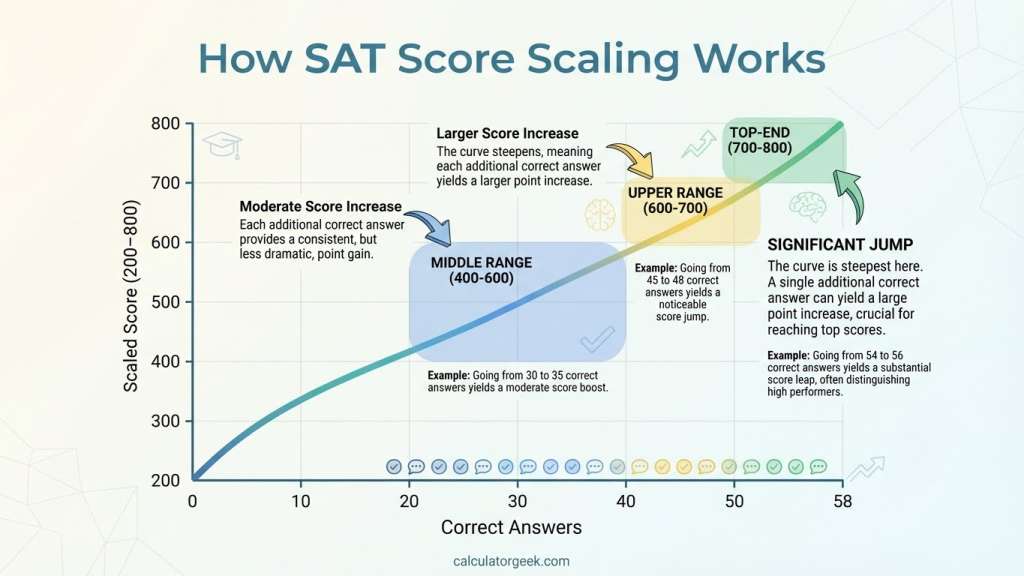
4) Score Scaling
Raw correct answers are converted into scaled section scores (200–800) using:
- Non-linear score curves
- Anchored reference points from real SAT score distributions
The calculator ensures:
- Near-perfect performance maps close to 800
- Lower raw scores do not scale linearly, reflecting real SAT behavior
This is why one additional correct answer does not always equal the same point increase.
5) Total Score Calculation
Your total SAT score is calculated using the official structure:
Total Score = Reading & Writing Score + Math Score
This produces a final result between 400 and 1600.
6) Estimated Percentiles
The calculator also displays Estimated User Percentiles, based on:
- College Board SAT User Group Percentiles
- Students who tested in the past three graduating classes
These percentiles compare your score to recent SAT test-takers, not the general population.
Best accuracy note: This calculator works best for U.S. SAT test-takers, since percentile data is based on U.S. College Board statistics.
7) Important Note
This tool provides a strong estimate, not an official score. Actual SAT scores may vary due to:
- Question difficulty variation
- Experimental questions
- College Board’s proprietary scaling adjustments
How to Use the Calculator (Step-by-Step)
Using the Sat Score Calculator takes less than a minute and works best when you enter results from a full, timed practice test.
Step 1: Select the Test Mode
Choose Digital SAT as your test type. Only use older or legacy modes if you are reviewing non-digital practice material for comparison purposes.
Step 2: Enter Reading and Writing Results
Input the number of correctly answered questions for:
- Reading and Writing – Module 1
- Reading and Writing – Module 2
The calculator automatically aligns sliders and numeric fields to prevent input errors.
Step 3: Enter Math Results
Enter your correct answers for:
- Math – Module 1
- Math – Module 2
Each math module allows up to 22 questions, so entering values beyond that will be flagged.
Step 4: Enable Adaptive Logic (Recommended)
Turn the Adaptive option ON if your practice test followed the real Digital SAT structure. This ensures Module 2 results are weighted based on your Module 1 performance.
Step 5: Calculate Your Score
Click Calculate to instantly view:
- Estimated Reading and Writing score
- Estimated Math score
- Combined total score (400–1600)
- Optional estimated percentile ranking
Step 6: Review and Plan
Use the breakdown to identify:
- Which section is limiting your score
- Whether accuracy or pacing is the bigger issue
- Where targeted practice will deliver the fastest improvement
Pro tip: Always calculate scores using results from complete practice tests, not individual drills, to maintain realistic estimates.
Digital SAT Exam Structure Explained
The Digital SAT is built around a module-based design that measures both accuracy and adaptability. Understanding this structure helps you interpret your calculator results more realistically—especially when comparing different practice tests.
Two Sections, Scored Separately
The exam includes two main sections:
- Reading and Writing
- Math
Each section is scored independently on a 200–800 scale. These two section results are then combined to form your total score between 400 and 1600.
Because each section is scored on its own, improvement in one area (for example, Math) can significantly raise your overall score even if the other section remains unchanged.
Module-Based Layout
Each section is divided into two modules:
- Module 1: Standard difficulty, taken by all students
- Module 2: Difficulty adapts based on Module 1 performance
This structure allows the test to better match question difficulty to your demonstrated skill level, rather than using one fixed set of questions for everyone.
Timing and Flow
- Reading and Writing is completed first, followed by a short break
- Math comes second, also split into two modules
- Each Math module allows 35 minutes, making time management a critical part of performance
Since each section is scored separately and adaptively, consistency across both modules is more important than rushing early questions.

Understanding SAT Score Ranges and Scaling
SAT scores are not calculated by simply turning correct answers into a percentage. Instead, the Digital SAT uses scaled scoring, which helps keep scores fair across different test forms and difficulty levels.
Why SAT Scores Are Shown as Ranges
When you use a calculator, your result may appear as a score range rather than a single fixed number. This is intentional and more accurate because:
- Different test forms vary slightly in difficulty
- The Digital SAT uses non-linear score curves
- Adaptive module difficulty affects how raw performance converts to scaled results
A range reflects how official scoring works in real testing conditions, rather than implying a false sense of precision.
Raw Scores vs. Scaled Scores
Here’s how the process works conceptually:
- Raw scores = the number of questions you answered correctly
- Scaled scores = the reported section scores on the 200–800 scale
- Total score = Reading & Writing score + Math score (400–1600)
Importantly, raw scores and scale scores are not linearly related. Missing one question near the top of the scale can cost more points than missing one in the middle.
What Scaling Is Designed to Do
SAT scaling aims to:
- Balance differences in question difficulty across test dates
- Ensure that a score reflects skill level, not test luck
- Keep score meaning consistent year to year
This is why two students with the same number of correct answers on different tests can receive slightly different scaled outcomes.
How Adaptive Scoring Works in the Digital SAT
The Digital SAT uses adaptive scoring at the module level, meaning the difficulty of questions you see later depends on how you perform earlier in the section. This adaptive design is a core reason why SAT scoring feels different from traditional paper-based exams.
How the Adaptive Model Works
- Module 1 is the same standard difficulty for all students
- Your performance in the first module determines the difficulty level of Module 2
- Strong Module 1 performance routes you to a harder Module 2
- Weaker Module 1 performance routes you to a slightly easier Module 2
This approach helps the test measure your true skill level more efficiently without overloading you with questions that are far above or below your ability.
Why Adaptive Scoring Affects Your Score
Because Module 2 difficulty changes:
- Correct answers in a harder Module 2 may carry more scoring weight
- Correct answers in an easier Module 2 may contribute slightly less
That’s why two students with the same total number of correct answers can receive different scaled section results—context matters, not just the raw count.
What This Means for Score Estimation
For the most realistic estimate:
- Module 1 accuracy is critical
- Early mistakes can influence the entire scoring path
- Consistent performance across both modules leads to more stable outcomes
This is why the SAT Score Calculator includes an Adaptive option—to reflect the real testing logic instead of treating every question as equal.
Complete Breakdown of the Digital SAT Format
This section pulls everything together into a clear, test-day–focused overview so students understand what actually happens from start to finish—and how that connects to the SAT Score Calculator.
Overall Test Flow
On test day, the Digital SAT follows this sequence:
- Reading and Writing Section
- Module 1 (standard difficulty)
- Module 2 (adaptive difficulty)
- Short Break
- Math Section
- Module 1 (standard difficulty)
- Module 2 (adaptive difficulty)
The exam is fully digital, taken on a laptop or tablet, and designed to reduce total testing time while preserving score reliability.
Timing Overview
- Reading and Writing: two timed modules back-to-back
- Math: two timed modules, with 35 minutes per module
- Total testing time is significantly shorter than the old paper SAT, but pacing still matters
Because timing is fixed per module, students can’t borrow time from one module to use in another. This makes time management per module an important preparation skill.
Question Design and Focus
- Reading and Writing questions emphasize clarity, grammar, vocabulary in context, and short passages
- Math questions focus on algebra, problem-solving, data analysis, and advanced math concepts
- A built-in calculator is available for Math, but conceptual understanding still matters
Why This Format Matters for Scoring
Since the SAT:
- Uses adaptive modules
- Converts raw performance into scaled results
- Scores each section independently
Your final outcome depends on accuracy, consistency, and early performance, not just total effort.
The SAT Score Calculator mirrors this structure so your estimate aligns with how the real Digital SAT behaves.
In Practice (Real-World Use Cases)
Understanding your SAT score estimate is most useful when you know how to apply it in real study and planning situations. Here are common, practical ways students use the SAT Score Calculator.
1) Tracking Progress Over Time
After each full practice test, students enter their results to:
- Monitor score trends week by week
- Identify whether improvements are consistent or fluctuating
- See which section is responding best to study efforts
Tracking estimates over time is more meaningful than focusing on a single test result.
2) Identifying Your Weakest Section
Because the calculator reports section-level outcomes:
- You can see whether Reading and Writing or Math is holding your score back
- Small gains in one section can sometimes produce larger gains in the total score
This helps prioritize study time where it will have the biggest impact.
3) Adjusting Study Strategy
Score patterns can reveal:
- Accuracy issues (many mistakes early)
- Pacing issues (accuracy drops late in modules)
- Gaps in specific content areas
Instead of studying everything equally, you can focus on targeted improvements.
4) Setting Realistic Score Goals
Estimated percentiles help you understand:
- How competitive your score is among recent test-takers
- Whether your target score is within reach before test day
This prevents unrealistic expectations and encourages data-driven goal setting.
5) Preparing for Retakes
For students planning a retake, the calculator helps:
- Evaluate whether additional prep is likely to raise the score meaningfully
- Decide when another attempt may be worthwhile
Used correctly, the calculator becomes a planning tool—not just a score checker.
Results Interpretation
Once the calculator generates your estimate, the next step is understanding what those numbers actually mean—and what to do with them.
What the Output Includes
Your results typically show:
- Reading and Writing score (200–800)
- Math score (200–800)
- Total score (400–1600)
- Optional estimated percentile comparing you to recent test-takers
Each value represents a scaled result, not a raw percentage.
How to Read Section Scores
- Section scores show strengths and weaknesses independently
- A strong Math score can offset a weaker Reading and Writing score (and vice versa)
- Improving one section by even a small margin can noticeably raise your total score
Because each section is scored separately, targeted improvement is often more effective than broad, unfocused practice.
Understanding the Total Score
Your total score is simply the sum of both section scores. Colleges often use this number for quick comparisons, but many also look closely at section balance—especially for math-heavy or writing-intensive programs.
Using Percentiles Wisely
Percentiles help answer the question: “How do I compare to other students?”
They are most useful for:
- Understanding competitiveness
- Setting realistic score goals
- Interpreting whether a score is average, strong, or exceptional
Remember, percentiles compare you to recent SAT test-takers, not all high school students.
Key Takeaway
A score estimate is most powerful when it informs your next decision:
- What to study next
- Whether to retake the test
- How close you are to your target range
The calculator provides direction—not judgment.
Tables & Charts
This section provides quick visual references that make SAT scoring easier to understand at a glance. These tables and charts complement the calculator by showing how section scores, totals, and scaling concepts fit together.
SAT Score Scale Overview
PLACE CHART HERE
- Placement: Immediately below this heading
- Suggested dimensions/aspect: 1200×675 (16:9)
- SEO alt text: “SAT score scale showing Reading and Writing, Math, and total score ranges”
- Nano Banana prompt (include calculatorgeek.com under visual):
“Create a clean educational chart titled ‘SAT Score Scale Overview’. Show two horizontal bars: ‘Reading & Writing (200–800)’ and ‘Math (200–800)’, plus a combined bar ‘Total Score (400–1600)’. Minimal colors, clear labels, modern typography. Add small centered text under the chart: ‘calculatorgeek.com’. 16:9, high resolution.”
| Score Type | Minimum | Maximum | What it Represents |
|---|---|---|---|
| Reading and Writing | 200 | 800 | Language and comprehension performance |
| Math | 200 | 800 | Mathematical reasoning and problem-solving |
| Total Score | 400 | 1600 | Combined SAT result used for comparisons |
Raw Answers vs. Scaled Scores
PLACE CHART HERE
- Placement: Immediately below this subheading
- Suggested dimensions/aspect: 1080×1080 (1:1)
- SEO alt text: “Diagram explaining raw correct answers versus scaled SAT scores”
- Nano Banana prompt (include calculatorgeek.com under visual):
“Square infographic titled ‘From Correct Answers to SAT Scores’. Left side: ‘Correct Answers (Raw)’. Middle: ‘Non-linear Scaling’. Right side: ‘Scaled Section Score (200–800)’. Bottom note: ‘Total = Reading & Writing + Math’. Clean academic style. Add small centered text under the graphic: ‘calculatorgeek.com’. 1:1 aspect, high resolution.”
| Concept | Meaning | Why It Matters |
|---|---|---|
| Correct answers | Questions answered correctly | Starting input for scoring |
| Raw performance | Total correct per section | Not reported directly |
| Scaled score | Official section score | What colleges actually see |
| Non-linear scaling | Uneven point changes | Explains why scores don’t move evenly |
Typical Score Interpretation Guide
| Total Score Range | General Interpretation | Common Next Step |
|---|---|---|
| 900–1100 | Foundational | Focus on core concepts and timing |
| 1100–1300 | Developing | Target weakest section first |
| 1300–1450 | Strong | Refine accuracy and pacing |
| 1450–1600 | Very strong / elite | Focus on precision and consistency |
Note: These ranges are general guidance only. Competitiveness depends on programs and goals.
These tables are meant to support understanding, not replace individualized interpretation. Always use your calculator results alongside study goals and target colleges.
Common Mistakes & Fixes
Even a well-built SAT score calculator can give misleading results if inputs or assumptions are off. Here are the most common mistakes students make—and how to fix them quickly.
1) Entering Attempted Questions Instead of Correct Answers
- Mistake: Typing how many questions you attempted rather than how many you got right.
- Fix: Enter only the number of correctly answered questions for each module.
2) Mixing Different Practice Test Formats
- Mistake: Combining results from different sources or formats in one calculation.
- Fix: Use results from a single, consistent practice test when estimating your score.
3) Leaving Adaptive Logic Turned Off
- Mistake: Disabling the Adaptive option even though your practice test followed the real Digital SAT structure.
- Fix: Turn Adaptive ON so Module 2 weighting reflects Module 1 performance.
4) Expecting Linear Score Changes
- Mistake: Assuming each correct answer adds the same number of points.
- Fix: Remember that SAT scoring is non-linear, especially near the top and bottom of the scale.
5) Ignoring Timing and Pacing
- Mistake: Treating accuracy as the only factor.
- Fix: Review where mistakes happen—early vs late in a module—to identify pacing problems.
6) Comparing Old and Digital SAT Scores Directly
- Mistake: Assuming older paper-based conversions apply directly to the Digital SAT.
- Fix: Use Digital SAT–specific estimates for current preparation.
Avoiding these errors ensures your calculator result reflects your true performance as closely as possible.
Limitations & Disclaimer
The SAT Score Calculator is designed to provide a realistic estimate, not an official score report. While it closely reflects how Digital SAT scoring behaves, several factors can cause your actual test-day score to differ.
What the Calculator Cannot Account For
- Exact question difficulty: Each test form varies slightly, and difficulty affects scaling
- Experimental questions: Some questions do not count toward scoring but still affect perception
- Proprietary adjustments: The College Board applies internal scaling methods that are not publicly disclosed
How to Use Estimates Responsibly
- Treat results as guidance, not guarantees
- Focus on trends across multiple practice tests, not a single score
- Use official score reports for admissions, scholarships, and final decisions
This tool is best used as a planning and diagnostic resource, helping you decide what to study next and whether additional preparation is likely to raise your score.
Accuracy & Editorial Standards (CalculatorGeek)
At CalculatorGeek, accuracy and clarity come before hype. Every calculator and supporting explanation is built with a user-first, evidence-based approach, especially for high-stakes topics like standardized testing.
How We Maintain Accuracy
- Structure-aligned logic: The calculator follows the real Digital SAT structure—two sections, two modules each, adaptive difficulty, and scaled outcomes.
- Consistency checks: Inputs are validated against realistic module limits and section totals to reduce user error.
- Non-linear scoring awareness: We intentionally avoid flat “points-per-question” assumptions and explain why score ranges exist.
- Practical interpretation: Results are framed to support decision-making (what to study next, whether to retake), not to promise exact outcomes.
Content Review & Updates
- Pages are reviewed when official SAT structure or scoring guidance changes
- Explanations are refined based on common user misunderstandings
- Outdated assumptions (especially from older paper SAT formats) are removed or clearly labeled
Our goal is to help you understand your results, not just see a number.
Author & Expert Reviewer
Sarah Mitchell — Educational Content Specialist
Role: SAT & Standardized Test Content Reviewer
Bio: Sarah Mitchell specializes in creating and reviewing student-focused educational content, with an emphasis on standardized testing, score interpretation, and exam strategy. She focuses on clarity, accuracy, and practical guidance so students can understand not just their scores, but what steps to take next.
This page has been expert-reviewed for clarity, scoring logic alignment, and real-world usability to ensure the calculator explanations remain accurate, accessible, and student-centered.
FAQs
How do I calculate my SAT score?
Count how many questions you answered correctly in each module, convert those results into scaled section scores, and add both sections together for your total score.
How do I figure out my SAT score from practice tests?
Use your correct-answer counts from a full Digital SAT practice test and enter them into the calculator with Adaptive mode enabled for the most realistic estimate.
Is 1200 a good SAT score?
A 1200 is generally considered solid, but whether it’s “good” depends on your target colleges and programs. Percentiles can help put it in context.
What is a 1400 SAT score equivalent to?
There is no direct equivalent across systems. A 1400 is typically competitive, but its meaning depends on percentiles and school expectations.
Is 1600 a perfect SAT score?
Yes. A total score of 1600 is the maximum possible score on the SAT.
Does a 1600 mean you got every question right?
Often yes, but not always. Because SAT scoring uses scaling, a near-perfect raw performance can sometimes still map to 1600.
How many wrong is a 1500 on the SAT?
There’s no fixed number. The same number of wrong answers can result in different scaled scores depending on test difficulty and module routing.
References
- College Board — How SAT scores are calculated (official overview): https://satsuite.collegeboard.org/scores/what-scores-mean/how-scores-calculated
- College Board — Digital SAT overview (test structure, sections, modules)
- College Board Research — SAT User Group Percentiles (recent graduating classes)
- Wikipedia — Educational assessment score scaling (background concept)