Percentage Difference Calculator
Percentage Difference Calculator
Choose what you want to calculate and enter V1 and V2. Results update automatically as you type.
People used this calculator
Your current platform: —
Global counter (server-side).
Percentage Difference Calculator (Compare Two Values Fairly)
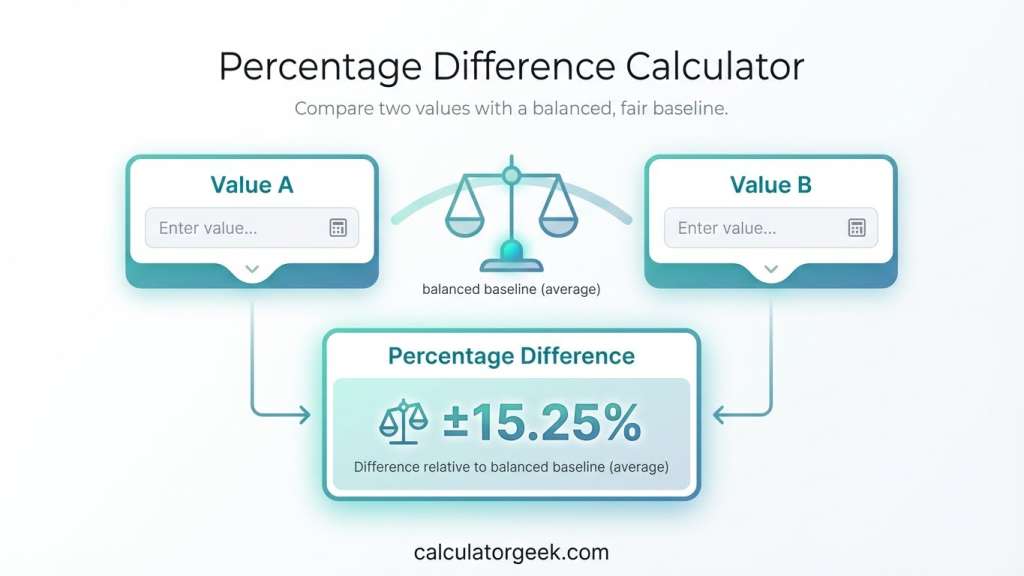
A Percentage Difference Calculator compares two values and shows how far apart they are as a percentage using a balanced baseline (typically the average of both values). It’s best when you’re comparing two measurements side-by-side and neither value is clearly the “starting” value.
This Percentage Difference Calculator is designed specifically for fair, side-by-side comparisons where choosing a baseline would distort the result.
If you want a fair comparison (instead of choosing a denominator that biases the result), the Percentage Difference Calculator gives a symmetric answer that’s easier to justify in reports, pricing comparisons, and general analysis.
Key Takeaways
- A Percentage Difference Calculator treats both inputs evenly (no “old vs new” bias).
- It’s ideal for side-by-side comparisons like vendor pricing, measurements, or estimates.
- It uses the absolute difference so the result is never negative.
- If you truly have a timeline (before → after), percent change may be the better metric.
- Small values can still make percentages look large—include the raw difference when reporting.
Quick Answer
Percentage difference = (|A − B| ÷ ((A + B) ÷ 2)) × 100%
(A and B are the two values you’re comparing.)
Typical Use Cases
Discount sanity checks: Compare sticker price vs checkout price when neither is clearly the “true” base.
Comparing prices: “How different are these two quotes as a percent?”
Quality checks: Compare two measurements from different tools or batches.
Performance comparisons: Compare two results without assuming one is the baseline.
Market analysis snapshots: Compare two figures from different sources in the same period.
How This Page Is Different
Most “% difference” explanations either (1) quietly switch to percent change (which assumes a baseline), or (2) give a formula without telling you when it’s the wrong tool.
This Percentage Difference Calculator page is built to prevent that:
- Baseline clarity: You’ll see when to use percentage difference vs percent change (so you don’t pick the wrong denominator).
- Reporting-ready interpretation: We show how to explain the result in plain English (especially for pricing, measurements, and comparisons).
- Mistake-proof workflow: We highlight common errors—like mixing units, confusing percent points, or interpreting “big %” from small numbers—before they cost you accuracy.
At a Glance
- A Percentage Difference Calculator compares two values fairly using a symmetric baseline.
- It does not assume one value happened “before” the other.
- The result is always non-negative because it uses the absolute difference.
- It’s best for side-by-side comparisons (prices, measurements, estimates).
- If you have a true timeline (before → after), use percent change instead.
Percentage Difference Calculator Summary for Quick Comparison
The Percentage Difference Calculator is designed for situations where two values must be compared without assuming either one is the baseline. A Percentage Difference Calculator treats both inputs equally, making it ideal for fair, side-by-side analysis.
When accuracy and neutrality matter, a Percentage Difference Calculator avoids the bias that can occur when percent change is applied incorrectly. This is why the Percentage Difference Calculator is commonly used for comparing prices, measurements, estimates, and reported figures.
If your goal is to explain how different two values are—rather than how much something increased or decreased—the Percentage Difference Calculator provides a clearer and more defensible result.
How to Use Percentage Difference Calculator
Using the Percentage Difference Calculator is straightforward, but getting a meaningful result depends on entering and interpreting the values correctly.
Follow this workflow:
- Enter Value A – the first number you want to compare.
- Enter Value B – the second number you want to compare.
- Confirm units match – both values must use the same unit (same currency, measurement, scale).
- View the percentage difference – the calculator returns a single, non-negative percentage.
- Interpret the result – read it as “the two values differ by X%.”
Using a Percentage Difference Calculator ensures both values are treated equally, which is essential when accuracy and neutrality matter.
Practical tip: If you catch yourself thinking “this one happened before the other,” pause. That’s often a sign you should use percent change, not percentage difference.
How Percent Difference Calculator Works On CalculatorGeek
The Percent Difference Calculator is designed to compare two values and express the difference between them as a percentage. Unlike percent change, percent difference treats both values equally and does not assume that one value came before the other.
This approach is what makes the Percentage Difference Calculator suitable for unbiased, side-by-side analysis.
This makes it especially useful when comparing measurements, experimental results, or quantities where there is no clear “original” value.
Step 1: Choose What You Want to Calculate
The calculator allows you to select between two related calculations:
- Percentage difference between V₁ and V₂
Use this option when you want to compare two values without considering which one is older or newer. - Percentage change from V₁ to V₂
Use this option when V₁ is the original value and V₂ is the new value, and you want to measure an increase or decrease.
An information (i) button explains the difference between these two options and only displays the explanation when clicked.
Step 2: Enter Values V₁ and V₂
- V₁ and V₂ represent the two values being compared.
- The calculator updates results automatically as soon as both values are entered.
There is no need to press a calculate button—the results refresh in real time.
Step 3: Apply the Appropriate Formula
Percentage Difference Formula
When percentage difference is selected, the calculator uses the average of the two values as the reference point:
Percentage Difference = |V₂ − V₁| / ((|V₁| + |V₂|) / 2) × 100
This formula ensures the comparison is fair and symmetric, meaning the result is the same regardless of which value is entered first.
Percentage Change Formula
When percentage change is selected, the calculator treats V₁ as the original value:
Percentage Change = (V₂ − V₁) / |V₁| × 100
This shows how much the value has increased or decreased relative to its starting point.
Step 4: View the Results
The calculator displays:
- Percentage difference or percentage change, depending on the selected option.
- Numerical difference between V₁ and V₂.
A short message explains the result and updates dynamically as inputs change.
Step 5: Interpret the Outcome
- A higher percentage difference indicates a larger relative gap between the two values.
- A positive percentage change indicates an increase from V₁ to V₂.
- A negative percentage change indicates a decrease.
These results help you quickly understand how far apart two values are or how much a value has changed over time.
Why Use the Percent Difference Calculator?
- It removes ambiguity when comparing two values.
- It avoids manual calculation errors.
- It is ideal for science, statistics, data analysis, and academic work.
- It updates instantly and supports easy result sharing.
The Percent Difference Calculator on CalculatorGeek provides a clear, accurate way to compare values using the correct mathematical approach for each situation.
Inputs & Outputs (What You Enter, What You Get)
The Percentage Difference Calculator is designed to be explicit about what goes in and what comes out, so there’s no ambiguity when you report the result.
Inputs & Outputs Table — Percentage Difference Calculator
| Field | Type | What it means | Example |
|---|---|---|---|
| Value A | Input | First value being compared | 100 |
| Value B | Input | Second value being compared | 120 |
| Absolute Difference | Output | |A − B| (raw gap) | 20 |
| Average of Values | Output | (A + B) ÷ 2 (baseline) | 110 |
| Percentage Difference | Output | Difference relative to average | 18.18% |
Every output shown by the Percentage Difference Calculator is derived from the same symmetric formula, so results remain consistent regardless of input order.
Clarity note: Because the calculator uses the average as the baseline, the result is the same no matter which value you enter first.
What Is Percentage Difference?
Percentage difference is a way to measure how far apart two values are as a percentage without choosing one as the base. Instead of dividing by one value (which can bias the result), it divides the absolute difference by the average of the two values.
Direct answer: Percentage difference tells you the relative gap between two numbers, treating them evenly.
This makes percentage difference especially useful when:
- Neither value is clearly “before” or “after.”
- You’re comparing peers (two prices, two measurements, two estimates).
- You want a symmetric comparison that doesn’t change if you swap inputs.
Important distinction:
- Percentage difference ≠ percent change.
- Percent change answers “how much did it change from the start?”
- Percentage difference answers “how different are these two values?”
This definition is the foundation of how a Percentage Difference Calculator reports difference without implying direction or causality.
The Percentage Difference Formula
The percentage difference formula is designed to compare two values fairly, without treating either one as the baseline.
Formula
Where:
- A = first value
- B = second value
- |A − B| = absolute difference (removes direction bias)
- (A + B) / 2 = average of the two values (balanced baseline)
Why this formula matters
- The absolute value ensures the result is never negative.
- The average denominator ensures symmetry—swapping A and B gives the same answer.
- The result reflects relative difference, not directional change.
Quick intuition check
If two values are:
- Very close → percentage difference is small
- Far apart → percentage difference is larger
This is exactly what you want when using a Percentage Difference Calculator for comparisons.
How to Find the Percentage Difference?
Calculating percent difference manually follows the same logic every time and avoids choosing a biased reference point.
Step-by-step calculation
- Take the absolute difference between the two values:
∣A−B∣ - Find the average of the two values:
(A+B)÷2 - Divide the difference by the average.
- Multiply by 100 to express the result as a percentage.
Worked example
Compare two measurements: 40 and 50
- Absolute difference = ∣40−50∣=10
- Average = (40+50)÷2=45
- Percent difference = 10÷45×100≈22.22
Result: The two values differ by 22.22%.
Why percent difference is symmetric
If you swap the values (50 and 40), the result stays 22.22%.
That symmetry is the defining feature of a Percentage Difference Calculator and the main reason it’s preferred for side-by-side comparisons.
Percentage Change Formula
The percentage change formula is often confused with percentage difference, but it answers a different question.
Formula
Where:
- Old = the starting (baseline) value
- New = the ending value
Key distinction
- Percentage change measures change relative to the old value.
- Percentage difference measures difference relative to the average of both values.
This difference in the denominator is critical. Using the percentage change formula when there is no true “old” value can unintentionally bias the result.
When this formula is appropriate
Use the percentage change formula when:
- There is a clear timeline (before → after).
- One value logically represents the baseline (original price, starting count, initial score).
If neither condition applies, the Percentage Difference Calculator is usually the better choice.
How to Calculate Percent Change
Percent change answers a before-and-after question: How much did something increase or decrease relative to where it started? It’s different from percentage difference because it requires a clear baseline.
Step-by-step method
- Identify the Old value (starting point).
- Identify the New value (ending point).
- Subtract: New − Old.
- Divide by the Old value.
- Multiply by 100 to get a percentage.
Worked example
- Old = 80
- New = 120
Result: 50% increase.
When to use percent change (and when not)
- ✅ Use it for timelines (prices over time, scores improving, growth).
- ❌ Don’t use it for peer comparisons where neither value is the baseline—use percentage difference instead.
Rule of thumb: If you can confidently say “this came after that,” percent change is appropriate.
When Is the Percentage Difference Useful and When Is It Confusing?
Direct answer: Percentage difference is useful when you want a neutral comparison between two values, and confusing when users expect a directional change.
When percentage difference is useful
Use a Percentage Difference Calculator when:
- You’re comparing two peers (prices from two vendors, two measurements, two estimates).
- Neither value is clearly “before” or “after.”
- You want a symmetric result that doesn’t change if inputs are swapped.
- Fairness matters more than direction (e.g., audits, benchmarks, quality checks).
In these cases, a Percentage Difference Calculator provides a clearer and more defensible summary than percent change.
When percentage difference can be confusing
Avoid (or clearly explain) percentage difference when:
- There is a timeline and users expect increase/decrease wording.
- Stakeholders want to know which direction things moved.
- One value is implicitly the baseline (original price, starting score).
- Values are near zero, which can amplify percentages.
Practical guidance: If readers ask “up or down?”, they’re probably looking for percent change, not percentage difference.
Percent Points vs Relative Percentages
Percent points and relative percentages are often mixed up, even though they describe different kinds of change.
Direct answer:
- Percent points describe the absolute difference between two percentages.
- Relative percentages describe the percent change relative to a base.
Percent points (absolute difference)
Percent points are used when both values are already percentages.
Example:
- Value A = 40%
- Value B = 50%
The difference is 10 percentage points (50% − 40%).
There’s no denominator involved—just subtraction.
Relative percentages (percent change or percent difference)
Relative percentages compare the difference relative to a base.
Using the same numbers:
- Relative percent change from 40% to 50% = (10÷40)×100=25
This is not 10%, and confusing the two can seriously distort interpretation.
Why this matters
- Reporting percent points as percentages can exaggerate or minimize change.
- Analysts, journalists, and marketers often misuse this unintentionally.
- A Percentage Difference Calculator helps avoid this by clearly defining the baseline.
Rule of thumb:
If both numbers already include “%”, think percent points first.
The Meaning of Percentage Difference in Real Life
In real life, percentage difference helps answer a simple but important question:
“How far apart are these two values, relative to their typical size?”
Because it doesn’t assume one value is “correct” or “original,” percentage difference is widely used where fairness and neutrality matter.
Everyday examples
- Comparing prices: Two stores sell the same item for 950 and 1,050. The percentage difference shows how far apart the prices are without implying one store raised or lowered its price.
- Measurements & experiments: Two instruments record slightly different values. Percentage difference summarizes the disagreement without choosing a reference instrument.
- Estimates & forecasts: Two projections for the same metric (e.g., demand, cost) can be compared evenly.
- Quality control: Two batches or samples can be compared without assuming one is the standard.
Why people prefer it in comparisons
- It avoids arguments about which value should be the base.
- It produces the same result regardless of input order.
- It communicates difference clearly when direction (up/down) isn’t the point.
Plain-language interpretation:
When you say “these two values differ by X%,” you’re usually describing percentage difference, not percent change.
How to Lie with Data Without Lying
Percentages can be technically correct and still mislead if the wrong metric is chosen. This section shows how that happens—so you can avoid it.
The most common tricks (often unintentional)
- Choosing a convenient baseline: Using percent change instead of percentage difference to make a result look larger or smaller.
- Hiding the denominator: Reporting a percentage without saying what it’s relative to.
- Using relative % instead of percent points: Turning a small absolute change into a dramatic-sounding percentage.
- Ignoring small baselines: Large percentages that come from tiny starting values without context.
Example: same numbers, different story
Two prices: 100 and 120
- Percent change (100 → 120): 20% increase
- Percentage difference: 18.18%
Both are mathematically valid—but they answer different questions. Choosing the wrong one can subtly bias interpretation.
How to stay honest and clear
- Use percentage difference for side-by-side comparisons.
- Use percent change only when a true baseline exists.
- State the reference clearly (old value, average, or percent points).
- Add the raw difference when percentages could mislead.
Bottom line: The math may be correct, but clarity depends on choosing the right percentage.
What Is a Percentage
A percentage is a way of expressing a number as a fraction of 100. It answers the question: “How much out of 100?”
Direct explanation:
- 1% means 1 out of 100
- 25% means 25 out of 100
- 100% means the whole amount
Percentages make it easier to compare values of different sizes using a common scale.
Why percentages are useful
- They normalize numbers so comparisons are fair.
- They’re intuitive for everyday decisions (prices, scores, rates).
- They reduce complex ratios into a single, readable value.
Percentages vs raw numbers
A difference of 10 units can mean very different things:
- From 20 to 30 → large relative change
- From 1,000 to 1,010 → small relative change
Percentages capture that relative meaning, which is why tools like the Percentage Difference Calculator and percent change formulas are so widely used.
How to Calculate X Percent of Y
This calculation finds a portion of a total by applying a percentage to a number.
Simple method
- Convert X percent into a decimal.
- Multiply the decimal by Y.
Formula
Worked example
- What is 25% of 80?
Result: 25% of 80 is 20.
Why this matters here
Understanding “X percent of Y” helps you:
- Interpret percentage difference results correctly.
- Convert percentage outputs back into real units for reporting.
- Avoid confusing relative percentages with absolute quantities.
How to Calculate X Is What Percent of Y
This calculation answers a very common question: “X represents what percent of Y?”
It’s different from percentage difference and percent change because it compares a part to a whole.
Simple method
- Divide X by Y.
- Multiply the result by 100 to convert it into a percentage.
Formula
Worked example
- 40 is what percent of 200?
Result: 40 is 20% of 200.
How this differs from percentage difference
- X is what percent of Y → part-to-whole relationship.
- Percentage difference → compares two values symmetrically.
Confusing these leads to incorrect reporting, especially in pricing, grades, and analytics.
How to Increase or Decrease X by Y Percent
This operation answers a directional change question: What is the new value after applying a percentage increase or decrease to X?
It’s related to percent change, but it’s not the same as percentage difference.
Increase X by Y percent
Method:
- Convert Y percent to a decimal.
- Multiply X by (1 + Y/100).
Formula:
Example:
Increase 200 by 15%
Result: 230
Decrease X by Y percent
Method:
- Convert Y percent to a decimal.
- Multiply X by (1 − Y/100).
Formula:
Example:
Decrease 200 by 15%
Result: 170
Important distinction
- Increasing or decreasing X by Y% assumes X is the baseline.
- A Percentage Difference Calculator does not assume a baseline—it compares two values symmetrically.
Related Calculator: Percent Decrease Calculator
Compounding and Averaging Percentages
Percentages don’t always behave intuitively when they’re applied repeatedly or combined. Understanding compounding and averaging prevents some of the most common interpretation errors.
Compounding percentages (why order matters)
When a percentage is applied more than once, the effects compound rather than add.
Example:
Increase a value by 10%, then increase it by 10% again.
- Start with 100
- After first increase: 100 × 1.10 = 110
- After second increase: 110 × 1.10 = 121
Result: A total increase of 21%, not 20%.
Key insight:
Percentages apply to the current value, not the original one.
Averaging percentages (why simple averages mislead)
Averaging percentages directly can produce incorrect conclusions.
Example:
- One item increases by 10%
- Another decreases by 10%
A simple average suggests 0% change, but the real combined effect depends on the starting values.
Correct approach:
- Convert percentages back into values.
- Average the values.
- Then compute percent change or percentage difference.
How this relates to percentage difference
- Percentage difference is safe for comparing two final values.
- Compounding explains how you got there.
- Averaging percentages without context often hides the truth.
Practical rule:
Never average percentages unless the bases are identical.
Related Calculator: Percent Change Calculator
Uses for a Percentage Calculator
A percentage calculator—including a Percentage Difference Calculator—supports far more than school math. It’s a practical tool across everyday decisions, analysis, and reporting.
Common uses across contexts
- Price comparisons: Compare two quotes or vendors fairly when neither price is the baseline.
- Measurements & testing: Quantify how far apart two readings are from different tools or methods.
- Performance snapshots: Compare two results from the same period without implying improvement or decline.
- Discount checks: Sanity-check labeled discounts by comparing list vs checkout prices side by side.
- Finance & planning (general guidance): Compare estimates, budgets, or projections without time bias.
- Education: Compare scores or outcomes from different assessments fairly.
- Quality control: Report variance between batches or samples in a neutral way.
Why calculators beat mental math
- They standardize the baseline, reducing bias.
- They prevent sign errors and denominator mistakes.
- They make results report-ready with consistent rounding.
Tip: Choose the calculator based on the question. Use percentage difference for comparisons; switch to percent change when you truly have a before-and-after.
Why Percentages Matter?
Percentages matter because they turn raw numbers into meaningful comparisons. They help us understand size, scale, and difference without being misled by absolute values alone.
Clarity over raw numbers
A change of 10 units means very different things depending on context:
- From 20 to 30 → significant
- From 1,000 to 1,010 → minor
Percentages reveal that context instantly.
Fair comparison
Percentages allow you to:
- Compare values of different magnitudes
- Normalize results onto a common scale
- Communicate differences clearly to non-technical audiences
This is why tools like the Percentage Difference Calculator are used in pricing, analysis, education, and reporting.
Better decisions, fewer mistakes
Using percentages correctly helps you:
- Avoid choosing the wrong baseline
- Prevent misleading interpretations
- Explain results transparently
Bottom line: Percentages don’t just simplify math—they shape how information is understood. Choosing the right percentage method makes your conclusions clearer, fairer, and more trustworthy.
Common Mistakes and Quick Fixes
Even when the math is correct, percentage difference results can be misunderstood if the wrong assumptions are made. These are the most frequent mistakes—and how to fix them quickly.
Mistake 1: Using percent change instead of percentage difference
Why it’s wrong: Percent change assumes a baseline (old → new).
Fix: If neither value is clearly the starting point, use a Percentage Difference Calculator.
Mistake 2: Forgetting the absolute value
Why it’s wrong: Without the absolute value, results can flip based on input order.
Fix: Percentage difference always uses |A − B|, so the result is never negative.
Mistake 3: Mixing units
Why it’s wrong: Comparing dollars to cents or meters to centimeters skews results.
Fix: Convert both values to the same unit before calculating.
Mistake 4: Reporting percentage without context
Why it’s wrong: A percentage alone can mislead, especially with small values.
Fix: Include the raw difference alongside the percentage.
Mistake 5: Confusing percent points with percentages
Why it’s wrong: A change from 40% to 50% is 10 percentage points, not a 10% change.
Fix: Use percent points for differences between percentages.
Quick check:
If your explanation requires “because I divided by…”, you probably need to clarify the metric.
When To Trust This Calculator
You can trust this Percentage Difference Calculator when your goal is to compare two values fairly rather than track change over time.
You can rely on the Percentage Difference Calculator when the situation matches these conditions. This checklist helps ensure the result is both mathematically sound and contextually appropriate.
Use this calculator with confidence when:
- You are comparing two values side by side with no clear “before” or “after.”
- Neither value should be treated as the baseline.
- Both values are expressed in the same unit (currency, measurement, score).
- You want a symmetric result that stays the same even if inputs are swapped.
- Direction (increase/decrease) is not the primary question.
Avoid or explain carefully when:
- There is a true timeline and stakeholders expect “up” or “down.”
- One value clearly represents an original or reference amount.
- Values are extremely close to zero, which can inflate percentages.
Simple rule:
If fairness matters more than direction, the Percentage Difference Calculator is the right tool.
When comparisons must remain neutral, the Percentage Difference Calculator provides consistent results, and the Percentage Difference Calculator ensures neither value is treated as the baseline.
Limitations & Disclaimer
Percentage difference is a useful comparison metric, but it’s not universal. Understanding its limits helps you avoid misinterpretation.
Even though the Percentage Difference Calculator is mathematically sound, it should always be used with an understanding of its contextual limits.
- Near-zero values: When both values are very small, even tiny differences can produce large percentages.
- Direction is hidden: Percentage difference does not indicate increase or decrease—only how far apart the values are.
- Context still matters: A single percentage can’t explain why values differ; it only summarizes the gap.
- Not a timeline metric: If one value clearly came before the other, percent change is usually more appropriate.
CalculatorGeek tools are designed for fast estimation and planning. Always confirm measurements and requirements before purchasing materials or making final decisions.
Ad & Content Safety Note
This Percentage Difference Calculator provides general calculation guidance for comparison and educational use. Results depend entirely on the values you enter and how you interpret them. For compliance-critical, financial, or formal reporting, always confirm definitions, baselines, and rounding rules with your applicable standard.
Accuracy & Editorial Standards
This page is written to prioritize clarity, correctness, and practical usefulness. Every explanation aligns with how the Percentage Difference Calculator actually works, using consistent terminology and real-world examples that reflect common user questions.
Our editorial standards include:
- Clear definitions that distinguish percentage difference from percent change
- Consistent formulas and notation across sections
- Plain-language interpretation to reduce reporting mistakes
- Mobile-first readability so calculations and explanations are easy to follow on any device
The calculator and content are designed to load quickly and present results cleanly, helping users verify and interpret comparisons without confusion.
Author Bio
Liam Parker
Role: MSc Mathematics
Liam Parker specializes in percentage-based analysis, comparative metrics, and mathematical clarity for decision-making tools. His work focuses on helping users choose the correct percentage method—such as percentage difference vs percent change—so results are fair, interpretable, and not misleading in real-world reporting.
FAQs (Voice-Friendly)
What is a Percentage Difference Calculator?
A Percentage Difference Calculator compares two values and shows how far apart they are as a percentage of their average, so neither value is treated as the baseline.
Hey Google, what’s the difference between percent difference and percent change?
Percent difference compares two values fairly using their average. Percent change compares a new value to an old value and needs a clear baseline.
How do I calculate the percentage difference?
Find the absolute difference ∣A−B∣, divide by the average (A+B)/2, then multiply by 100.
Does percentage difference tell me increase or decrease?
No. Percentage difference shows how far apart values are, not direction. If you need “up or down,” use percent change.
When should I use a Percentage Difference Calculator?
Use a Percentage Difference Calculator when you’re comparing two values side-by-side and neither one is clearly the starting value.
Why is my percentage difference so large for small numbers?
Small values make the average denominator small, which can inflate the percentage. Report the raw difference too for clarity.
Can I use this for comparing two prices?
Yes. A Percentage Difference Calculator is often the fairest way to compare two vendor quotes because it doesn’t assume one is the “true” price.
Is percentage difference the same as percent points?
No. Percent points are the simple subtraction between two percentages (like 50% − 40% = 10 points). Percentage difference is a relative comparison.
References
- OpenStax – Introductory Statistics
Percentage comparisons, relative difference, and interpretation of ratios and percentages in real-world analysis. - NIST (National Institute of Standards and Technology)
Guidance on measurement comparison, error, and reporting differences between observed values. - Wikipedia – Percentage Difference
General mathematical definition and comparison with percent change and percent error.
For neutral, side-by-side comparisons, the Percentage Difference Calculator delivers unbiased results, and the Percentage Difference Calculator remains the correct choice when no clear baseline exists.